CSS Scroll-Driven Animations: What They Actually Replace in Production
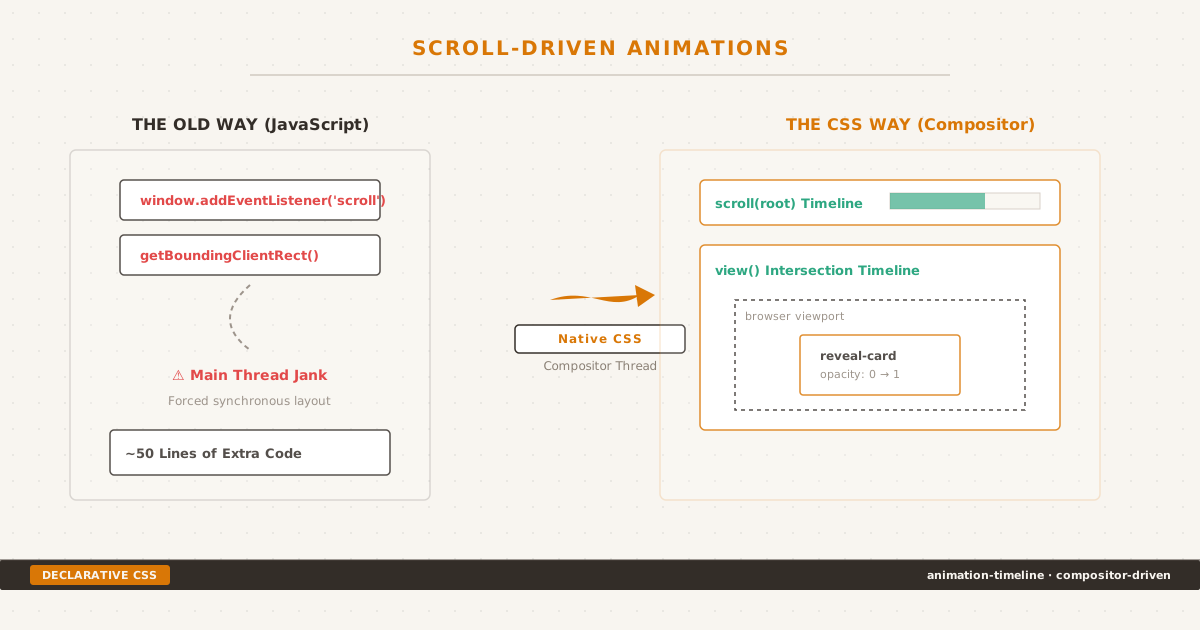
Shifting visual scroll effects from main-thread JavaScript to declarative, compositor-driven CSS animation timelines.
man scroll-driven-animations
Until last year, a progress bar that fills as you scroll meant 50 lines of JavaScript — a scroll event listener, getBoundingClientRect calls, requestAnimationFrame throttling, and a prayer that it does not jank on mobile.
Now:
.reading-progress {
animation: fill linear;
animation-timeline: scroll(root);
transform-origin: left center;
}
@keyframes fill {
from { transform: scaleX(0); }
to { transform: scaleX(1); }
}CSS Scroll-Driven Animations — the animation-timeline, scroll(), and view() API — let you tie animation progress to scroll position instead of wall-clock time. A card fades in when it enters the viewport. A parallax background shifts at a different rate. All without JavaScript, all on the compositor thread.
But this is not a tutorial. Tutorials are everywhere. This is a decision framework: what this API actually replaces in production, what it cannot replace, and the progressive enhancement pattern that keeps your site working when support is partial. It takes the same approach as CSS Anchor Positioning — replacing a JavaScript library with a declarative CSS API — but for scroll-driven effects instead of popover positioning.
The Two Timeline Types#
Scroll-Driven Animations provide two timeline functions that map scroll position to animation progress:
scroll() tracks the scroll progress of a scroll container. 0% is the container at its scroll origin (typically the top). 100% is the container fully scrolled. By default, the container is the root document.
.progress-bar {
animation: grow-width linear;
animation-timeline: scroll(root);
transform-origin: left center;
}
@keyframes grow-width {
from { transform: scaleX(0); }
to { transform: scaleX(1); }
}The progress bar fills from left to right as the user scrolls the entire page. No scroll event listener, no getBoundingClientRect calls, no requestAnimationFrame loop.
view() tracks an element’s visibility within its scroll container. The animation progresses as the element enters, passes through, and exits the viewport.
.reveal-card {
animation: fade-in-up linear both;
animation-timeline: view();
animation-range: entry 0% entry 100%;
}
@keyframes fade-in-up {
from { opacity: 0; transform: translateY(2rem); }
to { opacity: 1; transform: translateY(0); }
}The card fades and slides up as it enters the viewport. The animation-range property controls when the animation starts and ends — here, it plays during the full entry phase (from first pixel visible to fully visible).
These two functions cover the vast majority of scroll-linked visual effects. The difference is simple: scroll() for page-level progress tracking, view() for element-level entrance and exit effects.
Browser Support (July 2026)#
| Browser | Version | Status |
|---|---|---|
| Chrome | 115+ (Jul 2023) | Full support |
| Edge | 115+ | Full support |
| Safari | 18.2+ (Dec 2024) | Full support; threaded animations in 26.4 |
| Firefox | 126+ | Behind flag in stable 152; on by default in Nightly |
| Global | ~82% | Not yet Baseline |
The key number is 82% — not yet enough for Baseline status, specifically because Firefox stable has not flipped the flag to default-on. Firefox 126+ does support the feature, but users on stable releases need to enable layout.css.scroll-driven-animations.enabled in about:config.
This is a progressive enhancement feature by definition.
For comparison: Anchor Positioning reached ~81% and was granted Baseline Newly Available status in 2026 because all three engines had stable, default-on support. Scroll-Driven Animations is one flag flip away from joining it — and the Interop 2026 focus area commitment means Mozilla is actively closing the gap. By end of 2026, this number should hit 90%+.
The Progressive Enhancement Contract#
Because support is partial, every scroll-driven animation you ship must follow a three-layer graceful degradation pattern:
/* Layer 1: Default — visible, no animation */
.reveal-card {
opacity: 1;
transform: none;
}
/* Layer 2: Reduced motion preference */
@media (prefers-reduced-motion: no-preference) {
/* Layer 3: Feature support gate */
@supports (animation-timeline: view()) {
@keyframes fade-in-up {
from { opacity: 0; transform: translateY(2rem); }
to { opacity: 1; transform: translateY(0); }
}
.reveal-card {
animation: fade-in-up 1s linear both;
animation-timeline: view();
animation-range: entry 0% entry 100%;
}
}
}Three layers:
- Default state — the element is fully visible with no animation. A browser that does not support
animation-timelinerenders the content correctly — it simply does not animate. prefers-reduced-motion: no-preference— users who request reduced motion see no animation. This is not optional; it is a WCAG requirement.@supports (animation-timeline: view())— only browsers that understand the API get the animation. Firefox users without the flag, or users on older browsers, fall back to the static state.
The rule: author the finished state first, layer the animation on top. If your element starts invisible and relies on the animation to become visible, it stays invisible in unsupported browsers.
/* WRONG — invisible in Firefox stable */
.wrong-card {
opacity: 0;
animation: fade-in-up linear both;
animation-timeline: view();
}
/* RIGHT — always visible, animated when supported */
.right-card {
opacity: 1;
}
@media (prefers-reduced-motion: no-preference) {
@supports (animation-timeline: view()) {
@keyframes fade-in-up {
from { opacity: 0; transform: translateY(2rem); }
to { opacity: 1; transform: translateY(0); }
}
.right-card {
animation: fade-in-up 1s linear both;
animation-timeline: view();
animation-range: entry 0% entry 100%;
}
}
}What It Actually Replaces#
The real question is not “can this API do cool things?” — it can. The question is: which patterns should you migrate today, and which should you leave on JavaScript?
Replace: Reading Progress Bar#
The canonical example. Previously ~50 lines of JavaScript with a scroll listener. Now ten lines of CSS:
.reading-progress {
position: fixed;
top: 0; left: 0; right: 0;
height: 3px;
background: var(--accent);
transform-origin: left center;
animation: progress linear;
animation-timeline: scroll(root);
}
@keyframes progress {
from { transform: scaleX(0); }
to { transform: scaleX(1); }
}Verdict: ✅ Replace immediately. No interactivity needed, no complex sequencing, pure visual feedback.
Try it: Reading progress bar demo
Replace: Fade-In-on-Scroll (Reveal Animations)#
The most common scroll animation pattern. Previously IntersectionObserver + class toggle. Now view():
.reveal-item {
opacity: 1;
}
@media (prefers-reduced-motion: no-preference) {
@supports (animation-timeline: view()) {
@keyframes reveal {
from { opacity: 0; transform: translateY(2rem); }
to { opacity: 1; transform: translateY(0); }
}
.reveal-item {
animation: reveal 1s linear both;
animation-timeline: view();
animation-range: entry 0% entry 100%;
}
}
}Verdict: ✅ Replace. The CSS version runs on the compositor, costs zero JS bundle bytes, and respects reduced motion preferences natively. The IntersectionObserver version fires main-thread callbacks for every intersection change — a pattern I covered in depth for scroll-aware navigation. With view(), no observer setup, no class toggle, no cleanup.
Try it: Fade-in reveal demo
Replace: Parallax Background#
Parallax — background moving slower than foreground — used to mean scroll listeners calculating offset deltas and applying transforms on every frame. The compositor-friendly way:
.parallax-bg {
position: fixed;
top: 0;
width: 100%;
height: 120vh;
object-fit: cover;
animation: parallax linear;
animation-timeline: scroll(root);
}
@keyframes parallax {
to { transform: translateY(-20%); }
}Verdict: ✅ Replace. Parallax is a decorative effect. If it degrades (static background in unsupported browsers), the page is still usable. No interaction depends on it.
Try it: Parallax background demo
Replace: Scroll-Triggered CSS Class Addition#
Many sites use IntersectionObserver to add a class that triggers a CSS transition:
// Old pattern — remove when migrating
observer = new IntersectionObserver((entries) => {
entries.forEach(e => {
e.target.classList.toggle('is-visible', e.isIntersecting);
});
});/* Old CSS */
.is-visible { opacity: 1; transform: translateY(0); }This entire pattern becomes:
@keyframes show {
to { opacity: 1; transform: translateY(0); }
}
.reveal-item {
animation: show linear both;
animation-timeline: view();
animation-range: entry 0% entry 100%;
}Verdict: ✅ Replace. Fewer moving parts, no JavaScript state to manage, no class toggle timing issues.
Sequence Multiple Elements with animation-range#
One thing IntersectionObserver cannot do easily is control the timing relationship between multiple elements. With animation-range, each element can have its own scroll window:
.item-1 {
animation: reveal linear both;
animation-timeline: view();
animation-range: entry 10% entry 40%;
}
.item-2 {
animation: reveal linear both;
animation-timeline: view();
animation-range: entry 30% entry 60%;
}
.item-3 {
animation: reveal linear both;
animation-timeline: view();
animation-range: entry 50% entry 80%;
}Item 1 starts fading in when 10% of it is visible and finishes at 40%. Item 2 starts at 30% and finishes at 60%. The result is a cascading reveal — each element begins its animation before the previous one finishes — without any JavaScript sequencing logic.
Verdict: ✅ Replace. This is strictly better than JS sequencing because the browser handles the timing relative to scroll position, which is exactly what users perceive.
Try it: Animation sequencing demo
Keep: Scroll Direction Detection#
CSS scroll timelines can detect position but not direction. There is no @keyframes condition for “user is scrolling up vs down.”
/* This does not exist — CSS cannot detect scroll direction */
@keyframes wrong {
from { /* applies regardless of direction */ }
}If you need to change behavior based on scroll direction — show/hide a header on scroll down/up, trigger different animations on forward vs reverse scroll — JavaScript remains the only option.
Verdict: ❌ Keep JS.
Keep: Infinite Scroll#
Infinite scroll loads new content when the user reaches the bottom of a container. This is a data-fetching pattern, not a visual effect. CSS cannot trigger network requests or append DOM elements.
// Still needs JavaScript
const sentinel = document.querySelector('.scroll-sentinel');
const observer = new IntersectionObserver(([entry]) => {
if (entry.isIntersecting) loadMoreContent();
});
observer.observe(sentinel);Verdict: ❌ Keep JS.
Keep: Programmatic Timeline Control#
If you need play, pause, reverse, or scrub control — for a scrub-able demo, a video game cutscene, or a data visualization — the Web Animations API or a library like GSAP is the correct tool. CSS animation-play-state: paused can freeze a scroll-driven animation, but reversing direction (scrubbing backward) requires JavaScript.
// Scrub control — requires JS
const animation = element.animate(keyframes, {
timeline: new ViewTimeline({ subject: element })
});
animation.currentTime = scrubValue;Verdict: ❌ Keep JS (or use WAAPI).
Decision Matrix Summary#
| Pattern | CSS SDA | JS Still Needed | Migrate? |
|---|---|---|---|
| Reading progress bar | ✅ Yes | — | Immediately |
| Fade-in reveal | ✅ Yes | — | Immediately |
| Parallax background | ✅ Yes | — | Immediately |
| Section entrance sequencing | ✅ Yes | — | Immediately |
| Scroll class toggle (IO → SDA) | ✅ Yes | — | Immediately |
| Scroll direction detection | — | ❌ Track scrollY delta | Keep JS |
| Infinite scroll | — | ❌ IntersectionObserver + fetch | Keep JS |
| Programmatic scrub/reverse | — | ❌ WAAPI or GSAP | Keep JS |
| Complex physics/momentum | — | ❌ GSAP or Framer Motion | Keep JS |
| Non-visual side effects | — | ❌ Scroll event listener | Keep JS |
Performance: Compositor vs Main Thread#
The primary performance advantage of CSS Scroll-Driven Animations is not theoretical. It is measurable.
When you attach a scroll event listener in JavaScript:
window.addEventListener('scroll', () => {
const scrollPercent = window.scrollY / (document.body.scrollHeight - window.innerHeight);
progressBar.style.transform = `scaleX(${scrollPercent})`;
});Every scroll frame triggers:
- A JavaScript function call
- A forced layout read (
scrollY,scrollHeight,innerHeight) - A style recalculation
- A compositor commit
On a mid-range mobile device (Moto G7 baseline), step 1–2 alone consumes 2–4ms — 12–25% of the 16ms frame budget for 60fps. If the main thread is busy with other work (analytics, rendering, network callbacks), the frame budget is exceeded, and the user sees jank.
With the CSS version:
.progress-bar {
animation: progress linear;
animation-timeline: scroll(root);
}There is zero JavaScript execution. The browser’s compositor thread handles the animation directly — no main thread involvement, no layout querying, no style recalculation. The animation updates at the compositor’s refresh rate, which can exceed the main thread’s frame rate.
The effect compounds: JavaScript scroll listeners on the main thread not only add latency but also trigger layout thrashing (forcing synchronous style recalculations via getBoundingClientRect or scrollY reads). CSS scroll-driven animations never read layout values — the compositor receives scroll position data directly from the scrolling mechanism.
For sites that care about Interaction to Next Paint (INP), replacing scroll-event-driven visual effects with CSS scroll-driven animations removes a class of main-thread work that contributes to slow interactions.
The Firefox Asterisk#
Firefox’s implementation status deserves its own section because it is the single factor keeping this feature out of Baseline.
Firefox 126+ includes scroll-driven animations behind the layout.css.scroll-driven-animations.enabled flag. As of Firefox 152 (June 2026), stable releases still require manual flag flipping. Nightly has it enabled by default.
The situation is nuanced: Firefox’s CSS support (parsing animation-timeline, scroll(), view()) is complete. The missing piece is the JavaScript API (ScrollTimeline and ViewTimeline constructors). This means:
- CSS-based scroll-driven animations work in Firefox Nightly
- The polyfill (flackr/scroll-timeline) detects CSS support and skips loading — but then discovers the JS API is missing, causing a partial failure mode
- Firefox stable users do not trigger the CSS feature at all, which means
@supports (animation-timeline: view())correctly resolves to false, and they fall back to the static state
The practical outcome: the @supports + prefers-reduced-motion pattern above protects Firefox stable users. They see static content, which is the correct fallback. Firefox Nightly and future stable releases get the animation.
Interop 2026 includes Scroll-Driven Animations as a focus area. Mozilla has committed to shipping it default-on. The question is whether this happens before the Interop 2026 dashboard closes or slips to 2027. Given Mozilla’s resource constraints (being the only non-billionaire-owned engine), I would expect a flag flip in Firefox stable by Q4 2026, not sooner.
animation-range: The Fine Control#
The animation-range property is what separates scroll-driven animations from a simple “scroll = progress” mapping. It defines the start and end points of the animation along the timeline.
For scroll():
animation-range: 0% 100%; /* default — full scroll range */
animation-range: 25% 75%; /* animation plays during middle 50% of scroll */For view():
| Value | Start | End |
|---|---|---|
entry 0% entry 100% | First pixel enters | Fully entered |
cover 0% cover 100% | Before enters (off-screen bottom) | Past exits (off-screen top) |
entry 0% cover 50% | Enters | Halfway through viewport |
contain 0% contain 100% | Fully visible | Starts to exit |
The named timeline ranges — entry, exit, cover, contain, entry-crossing, exit-crossing — map to specific points in an element’s visibility lifecycle. In practice, entry and cover are the two you will use most:
entry 0% entry 100%— animation completes as the element scrolls incover 0% cover 100%— animation spans the element’s full visibility from before entry to after exit (useful for parallax)
You can also use px or percentage values for precise placement:
.reveal-card {
animation: reveal linear both;
animation-timeline: view();
animation-range: entry 0% entry 40%;
}The animation plays during the first 40% of the element entering. After 40% visibility, the animation is complete and the element stays in its final state. This is useful for cards in a grid where you want the reveal to finish before the user has scrolled past the element.
Named Timelines and timeline-scope#
For cases where the animated element and the observed element are not the same DOM node — for example, a progress bar in the header that tracks a specific article section rather than the full page — named timelines decouple observation from animation:
.article-section {
view-timeline-name: --section-progress;
}
.header-progress-bar {
animation: progress linear;
animation-timeline: --section-progress;
}The view-timeline-name property on the article section creates a named view timeline. The progress bar in the header references it with animation-timeline: --section-progress. The bar fills as that specific section scrolls through the viewport.
timeline-scope extends this by letting you share a timeline across different DOM branches — a timeline defined in one subtree can be referenced by elements in a completely unrelated subtree:
:root {
timeline-scope: --hero-progress;
}
.hero-section {
view-timeline-name: --hero-progress;
}
.sidebar-indicator {
animation: progress linear;
animation-timeline: --hero-progress;
}This solves the most common limitation of early scroll-driven animation experiments: the observed element and the animated element had to be in the same scroll container subtree. With timeline-scope, the sidebar can track the hero section even though they are in entirely different parts of the DOM.
Migration Strategy#
If you maintain an existing codebase using IntersectionObserver or scroll listeners for visual effects, here is the order of migration:
Reading progress bar — pure visual, no interaction dependency. Replace first, low risk.
Fade-in reveal animations — one-to-one replacement of IntersectionObserver + class toggle with
view()+@keyframes. Wrap in@supportsand keep the old CSS transition as fallback.Parallax containers — decorative by nature. Replace the JS-driven parallax with
scroll(). If parallax is critical to brand identity, keep JS as fallback until Firefox ships default-on.Section sequencing — replace only if your sequencing logic is linear (item 1 then 2 then 3). If it depends on scroll position or viewport size, test carefully —
animation-rangevalues are viewport-relative.Remove IntersectionObserver code — only after confirming that all visual effects are gated by
@supportsand the default state is correct.
Do not migrate patterns that need direction detection, infinite scroll, or programmatic control. Those remain JavaScript concerns.
Alongside CSS Anchor Positioning (replacing Floating UI) and Cross-Document View Transitions (replacing SPA routers), Scroll-Driven Animations completes a trilogy of CSS APIs that shift work from JavaScript to the compositor thread. Each follows the same pattern: author the fallback first, layer the enhancement on top, respect user preferences.
The Bottom Line#
$ ./checklist --feature scroll-driven-animations
[x] scroll() for page-level scroll progress tracking
[x] view() for element-level entrance/exit effects
[x] animation-range for fine-grained timing control
[x] @supports (animation-timeline: view()) progressive enhancement
[x] prefers-reduced-motion: no-preference gate
[x] Default finished state (no animation dependency)
[ ] Firefox flag status checked against audience analytics
[ ] Named timelines + timeline-scope for cross-DOM tracking
[ ] JS libraries replaced: IntersectionObserver for reveals,
scroll event listeners for progress bars,
GSAP ScrollTrigger for parallax (basic cases)
$ _Scroll-Driven Animations are production-ready today — as long as you treat them as progressive enhancement, not a dependency. Author the finished state first. Layer the animation on top. Respect user preferences.
The patterns that this API replaces are the ones that never needed JavaScript in the first place: visual decoration tied to scroll position. The patterns it cannot replace are the ones that involve data fetching, user interaction state, or direction-aware logic.
That boundary is clear, and it is unlikely to shift. Scroll-driven animations are a compositor-level API designed for visual effects. They do not aim to replace all scroll-related JavaScript — and they should not. What they do replace is a category of code that always felt like overengineering: a scroll listener for a progress bar, an IntersectionObserver for a fade-in, a library for parallax.
Removing that code makes your site faster, your bundle smaller, and your main thread freer for work that actually needs it.