Where Are You Reading? Building a Table of Contents That Knows
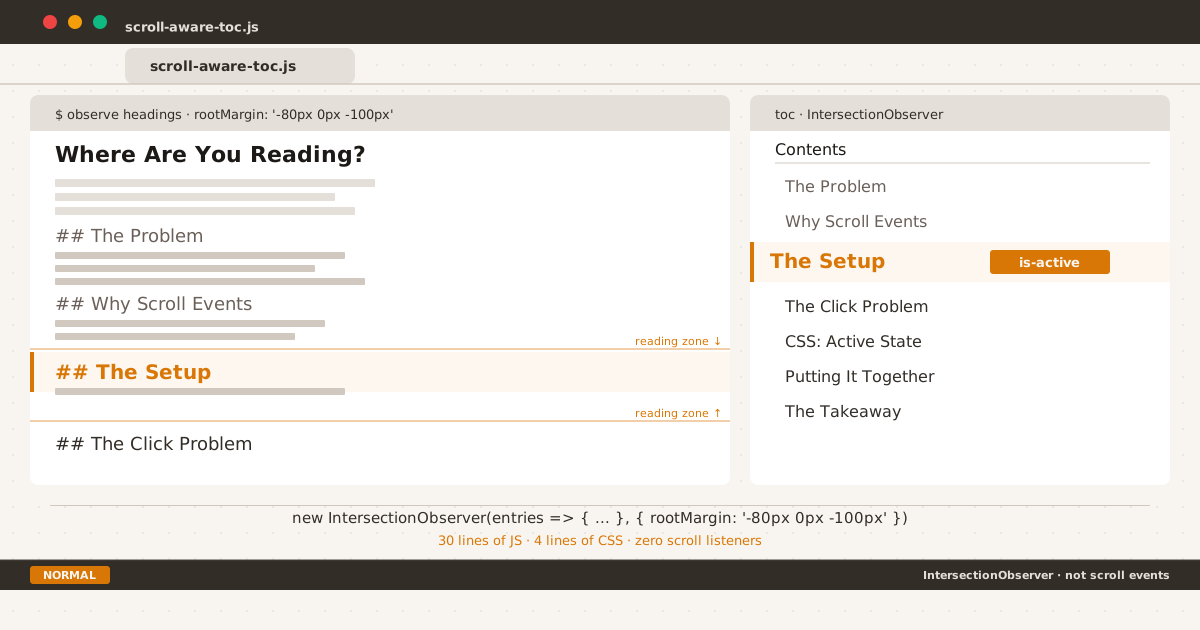
The reading zone tells the observer where you are. The TOC tells you.
The Problem#
You’re reading a long technical article. Fifteen minutes in, you glance up at the table of contents to check: how much is left? Which section am I in?
Nothing is highlighted. The TOC is a static list of links — useful for navigation, but silent about your current position. You have to estimate by visual scanning: “That heading sounds familiar. I must be somewhere around here.”
This is not a flaw in the article. It’s a missing piece of UX feedback — a small one, but one that compounds over every scroll interaction across every long-read session.
Why Scroll Events Are Obsolete#
The old approach to solving this was a scroll event listener:
window.addEventListener('scroll', () => {
// Calculate which heading is in view
// Update the TOC
});This has three problems:
- Scroll events fire on every pixel. Even with throttling, you’re querying
getBoundingClientRect()on every frame, which forces layout recalculations. - The math is fragile. You need to loop through headings, compare their positions, and handle edge cases (no headings in view, multiple headings in view, headings below the fold).
- The performance cost is real. On mobile, a scroll listener running JavaScript on the main thread can cause visible jank during scrolling.
IntersectionObserver solves all three. It is an asynchronous, browser-native API that notifies your code only when an element’s visibility changes relative to a root element (usually the viewport). [1] The browser handles intersection calculations on the compositor thread — not the main thread.
The Setup#
The core idea: observe every heading in your article. When a heading enters a defined “reading zone” near the top of the viewport, highlight its corresponding TOC entry.
Step 1: Query the Headings#
const links = document.querySelectorAll('.toc a[href^="#"]');
if (!links.length) return;
const headings = [];
links.forEach(link => {
const id = link.getAttribute('href').slice(1);
const heading = document.getElementById(id);
if (heading) {
heading._tocItem = link.parentElement;
headings.push(heading);
}
});Step 2: Create the Observer#
const visible = new Set();
const observer = new IntersectionObserver(entries => {
entries.forEach(entry => {
entry.isIntersecting
? visible.add(entry.target)
: visible.delete(entry.target);
});
// Clear all active states
links.forEach(link => link.parentElement.classList.remove('is-active'));
// Sort visible headings by position, pick the topmost
const sorted = Array.from(visible).sort(
(a, b) => a.getBoundingClientRect().top - b.getBoundingClientRect().top
);
if (sorted.length) {
sorted[0]._tocItem.classList.add('is-active');
} else if (headings.length) {
// Fallback: keep first heading active when nothing is in the zone
headings[0]._tocItem.classList.add('is-active');
}
}, {
rootMargin: '-80px 0px -100px',
threshold: 0
});
headings.forEach(h => observer.observe(h));The Root Margin Explained#
The rootMargin value -80px 0px -100px defines the “reading zone”:
- -80px top: The observer starts 80 pixels below the viewport top. This prevents the TOC from activating a heading when only its anchor link is at the very top edge of the screen.
- -100px bottom: The observer stops 100 pixels above the viewport bottom. This ensures a heading isn’t considered “active” when it’s about to scroll off-screen.
The result is a zone where the user is actually reading — not scanning past or glancing at. [2]
The # links in the TOC point to heading IDs generated by markdown-it-anchor. Those same auto-generated anchors can cause phantom spacing on narrow viewports — a CSS fix I covered separately — but for the observer’s purpose, the href="#section-id" pattern works exactly as needed.
The Click Problem#
There’s one edge case that pure IntersectionObserver can’t handle: clicking.
When a user clicks a TOC link, the browser scrolls to the target heading. The observer fires. If the target heading is now in the reading zone, the TOC updates correctly. But there’s a brief perceptual gap — the click happened, nothing changed visually, and then the scroll completes.
The fix is a click handler that updates the TOC immediately:
links.forEach(link => {
link.addEventListener('click', () => {
links.forEach(l => l.parentElement.classList.remove('is-active'));
link.parentElement.classList.add('is-active');
});
});This gives instant feedback. The observer then takes over after the scroll settles. The user never sees a stale active state.
CSS: The Active State#
.toc li.is-active {
border-left-color: var(--accent);
}
.toc li.is-active a {
color: var(--accent);
font-weight: 600;
}Two changes: the left border turns accent-colored (amber/orange in light mode), and the link text follows. This is enough visual weight to indicate “you are here” without overwhelming the rest of the TOC.
A Bonus Side Effect#
On mobile devices, tapping a link leaves a :hover pseudo-state that persists until the user taps elsewhere. At first, I considered this a bug. But it turned into a useful navigation history indicator:
is-activetells you where you are now (updated by the observer).:hoverpersist tells you where you just clicked (a light residual color).
Two pieces of information, one visual effect. It works because the is-active class pulls the same accent color from the same CSS custom property — the two indicators blend visually but originate from different mechanisms.
Putting It All Together#
The complete implementation is under 30 lines of JavaScript and 4 lines of CSS:
(function(){
var l = document.querySelectorAll('.toc a[href^="#"]');
if (!l.length) return;
var m = [];
l.forEach(function(a){
var h = document.getElementById(a.getAttribute('href').slice(1));
if (h) { h._t = a.parentElement; m.push(h); }
a.addEventListener('click', function(){
l.forEach(function(x){ x.parentElement.classList.remove('is-active'); });
this.parentElement.classList.add('is-active');
});
});
var s = new Set();
var v = new IntersectionObserver(function(e){
e.forEach(function(e){ e.isIntersecting ? s.add(e.target) : s.delete(e.target); });
l.forEach(function(a){ a.parentElement.classList.remove('is-active'); });
var t = Array.from(s).sort(function(a,b){
return a.getBoundingClientRect().top - b.getBoundingClientRect().top;
});
if (t.length) t[0]._t.classList.add('is-active');
else if (m.length) m[0]._t.classList.add('is-active');
}, { rootMargin: '-80px 0px -100px', threshold: 0 });
m.forEach(function(h){ v.observe(h); });
if (m.length) m[0]._t.classList.add('is-active');
})();The Takeaway#
IntersectionObserver has been widely supported since 2019. [3] There is no reason to write scroll-spy math by hand anymore. The API is declarative, performant, and simpler than any scroll-listener alternative.
For the user sitting halfway through your article, glancing up at the TOC to see where they are — that moment of clarity, knowing exactly how far they’ve read and what’s ahead — costs you 30 lines of code and zero performance budget.
Notes#
MDN describes IntersectionObserver as providing “a way to asynchronously observe changes in the intersection of a target element with an ancestor element or with a top-level document’s viewport.” The key word is asynchronously — the browser schedules notifications on its own terms, not on every pixel scroll. ↩︎
The exact rootMargin values depend on your layout. If your article has a sticky header, adjust the top value to match the header height. If your viewport is shallow (mobile), you may want a smaller bottom margin to give more room for activation. ↩︎
IntersectionObserver is supported in Chrome 51+, Firefox 55+, Safari 12.1+, and Edge 79+. No polyfill needed for any browser that matters in 2026. ↩︎