Breaking Chronology: A Framework for Pinned Content ★
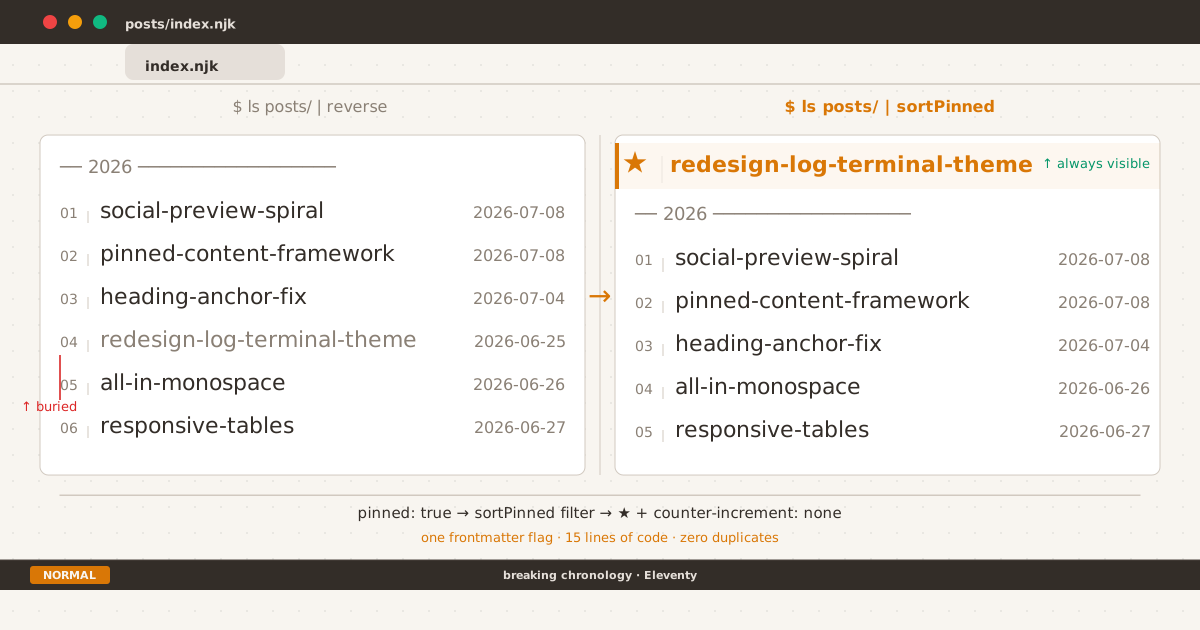
Before and after: one frontmatter flag moves the right post to the top.
Every blog has one post that matters more than the rest. A getting-started guide. A design manifesto. A “what is this blog about” that reads like a mission statement.
Chronology says: put it at position four, after three newer posts. The reader scrolls past it to reach the latest entry. They might not know it exists.
Pinned posts solve this — a single item that stays at the top of your post list regardless of publication date. The concept is simple. The execution is where most people overthink it.
Before You Pin: A Framework#
A pinned post breaks one of the core contracts of a blog: chronological order. Before you break that contract, ask three questions.
1. Permanent or Seasonal?#
A post pinned for the wrong reason is worse than no pinned post. It creates confusion when readers expect new content at the top.
Permanent pins — An about page, a changelog, a manifesto. Content that stays relevant indefinitely. These are the strongest candidates.
Seasonal pins — A call for submissions, a conference announcement, a temporary notice. These should always have an expiration plan. If you pin seasonally, schedule a calendar reminder to unpin it.
The test: If the pinned post is still relevant six months from now, pin it. If not, find another way to surface it.
2. One or Many?#
Multiple pinned posts defeat the purpose. A single pin creates focus. Two pins split attention. Three pins just look like a broken sort order.
The rule: one pinned post, maximum. If you have more than one post that needs prominence, consider a dedicated “featured” section below the pinned item — not a second pin.
3. Index Only or Everywhere?#
A pinned post on the main index makes sense. Should it also float to the top of tag pages? RSS feeds? Archive views?
There is no universal answer, but there is a consistent principle: pinned is a visual site concept, not a content priority signal. Applying it to RSS feeds breaks the expectations of feed readers (which are inherently chronological). Applying it to tag pages is debatable — some readers browse tags specifically for chronological exploration.
My default: pin on the main index only. Let tag pages and feeds stay naturally sorted.
The Design Constraints#
Once you’ve decided to pin, the implementation must satisfy three constraints:
- Visual distinction — The pinned post should not look like “post number one in a sorted list.” It needs a signal that says “this one is special.”
- Count integrity — The pinned post counts toward the total post count. It isn’t excluded, duplicated, or hidden.
- Chronological clarity — The rest of the list should still look and feel chronological. The year labels, the date stamps, the reverse-chronological flow — all preserved for the unpinned posts.
These constraints rule out the simplest implementation (hardcoding a post at the top of your template). That approach breaks count integrity and skips the visual distinction problem. A proper solution needs all three.
The Implementation#
Here is how I applied this framework to this blog. The specific stack is Eleventy, but the pattern translates to any SSG.
Step 1: The Frontmatter Flag#
A boolean field in the post’s frontmatter:
pinned: trueNo separate configuration file. No hardcoded list of post slugs. The data lives with the post, where it belongs.
Step 2: A Sort Filter#
The filter takes the full post collection and returns pinned items first, then everything else in reverse-chronological order:
eleventyConfig.addFilter("sortPinned", (collection) => {
const pinned = collection.filter(p => p.data.pinned);
const rest = collection.filter(p => !p.data.pinned).reverse();
return [...pinned, ...rest];
});This is the entire logic. Two arrays, one spread. It replaces the standard | reverse in your post list template.
Step 3: The Template Adjustments#
Three changes in the loop that renders your post list:
- {% for post in collections.posts | reverse %}
+ {% for post in collections.posts | sortPinned %}
- {% if postYear !== currentYear %}
+ {% if not post.data.pinned and postYear !== currentYear %}The first line swaps the sort order. The second line prevents a year label from rendering above the pinned post — it sits outside the chronological grouping, as it should.
And a class for styling:
- <li class="post-item">
+ <li class="post-item{% if post.data.pinned %} pinned{% endif %}">Step 4: The Visual Treatment#
The pinned post gets a ★ in place of its numbered counter:
.post-item.pinned {
counter-increment: none;
}
.post-item.pinned::before {
content: "★";
color: var(--accent);
font-size: 0.85rem;
}The ★ is amber (accent color), larger than the standard counter, and the post itself skips counter increment so the numbering stays continuous for the rest of the list.
The Result#
★ │ $ cat ~/redesign-log 2026-06-25 ← pinned, outside year-group
01 │ all-in-monospace 2026-06-26
02 │ building-conditional-notice 2026-06-27
03 │ responsive-tables ...The pinned post sits above the year label. The counter starts at 01 for the unpinned posts. The date stamps remain visible. The count in the header ("12 entries") includes the pinned post because it reads from the original collection, not the sorted copy.
What Not to Do#
Two anti-patterns I see often:
Hardcoding. Manually inserting a post at the top of a template. It works once, breaks when you unpin, and your post count is now wrong.
Duplicating in frontmatter. Some implementations add pinned: true and also require the post slug in a separate configuration array. Redundant data is a maintenance trap.
A single frontmatter flag handles both the decision and the display. Everything else follows from it.
The Takeaway#
Pinned posts are a compromise between two legitimate needs: chronology tells readers what’s new; prominence tells readers what’s important. A good implementation minimizes the compromise.
A framework helps you decide if the compromise is worth it. A frontmatter flag and 15 lines of code help you execute it cleanly. A ★ helps your readers see it at a glance.
The redesign log was the first post I pinned — a field log of transforming this blog into a terminal-themed space. It was not the newest post, but for a first-time visitor, it was the most important one. That is exactly the kind of case this framework was made for.
Complementary reading: DIY Draft System for Eleventy v3 — another way to extend your Eleventy blog beyond default behavior.