The Monogram S: 55×55 Pixels and the Design System Behind It
This post describes the previous blog design. The site has since been redesigned.
Every design system needs an anchor. On this blog, it’s the letter “S” in a bordered box — 55 pixels wide, 55 pixels tall. From that single element, I derived the theme toggle size, the favicon, the Apple touch icon, the PWA maskable icon, and even the copy button.
This is the story of those 55 pixels.
The Old Logo#
Before the revamp, the site had a circular SVG logo — a stylized “S” wrapped in a ring. It was fine, but it didn’t do anything. It sat in the header, looked decorative, and offered no interaction or system integration.
When I rebuilt the site, I wanted a logo that wasn’t just decoration. I wanted an element that could scale — literally and metaphorically — across every corner of the site.
A letter in a box. Simple enough to render at 16×16 pixels, scalable enough to fill a 512×512 PWA icon, and modular enough to participate in the golden ratio system.
The Fibonacci Decision: 55×55#
Why 55 pixels? Because it’s a Fibonacci number — part of the same mathematical sequence that converges on the golden ratio (φ = 1.618).
If you follow the Fibonacci sequence: 0, 1, 1, 2, 3, 5, 8, 13, 21, 34, 55, 89, 144 — the number 55 sits between 34 and 89. Those two neighbors gave me:
- 34px → The theme toggle size (55 ÷ φ ≈ 34)
- 89px → Not used yet, but available for future elements
Before this change, the S box was 52×52 pixels — an arbitrary number chosen because it “looked fine.” Bumping it to 55 gave it mathematical backing and unlocked a proportional relationship with the theme toggle. The 3-pixel increase is invisible to the eye, but the 55/34 relationship is perceptible as harmony.
.site-logo {
width: 55px;
height: 55px;
}One SVG to Rule Them All#
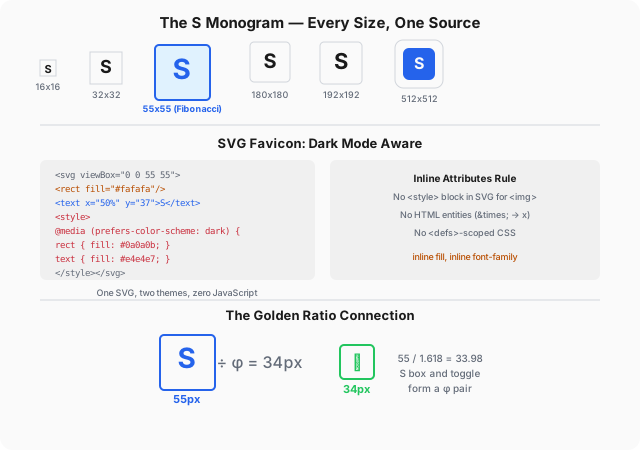
The S monogram lives in a single SVG file (assets/img/favicon/favicon.svg). That one file generates:
| Size | Format | Where it goes |
|---|---|---|
| 16×16 | SVG | Browser tab favicon |
| 32×32 | SVG | Browser tab (retina) |
| 55×55 | SVG | Site sidebar logo |
| 180×180 | PNG | Apple Touch Icon |
| 192×192 | PNG | PWA manifest |
| 512×512 | PNG | PWA maskable icon |
Six (or more) outputs, one source. The PNGs are generated from the SVG via sharp during build, but the SVG itself is the canonical version.
Dark Mode Favicon#
One of the nicest details: the favicon automatically switches between light and dark themes — no JavaScript required.
<svg xmlns="http://www.w3.org/2000/svg" viewBox="0 0 55 55">
<defs>
<style>
@media (prefers-color-scheme: dark) {
rect { fill: #0a0a0b; }
text { fill: #d6d6da; }
}
</style>
</defs>
<rect width="55" height="55" fill="#fafafa" rx="6"/>
<text x="27.5" y="37" font-family="system-ui,sans-serif"
font-size="32" font-weight="700" fill="#1b1e23"
text-anchor="middle">S</text>
</svg>Because favicon.svg is linked directly in <head> (not loaded via <img>), prefers-color-scheme inside <style> works correctly. This is the one place where a <defs>-scoped <style> block is acceptable — because the SVG is loaded as an icon, not as an <img src>.
The result: a white-background “S” in light mode, a dark-background “S” in dark mode. No flicker, no JavaScript, no extra HTTP request.
The Maskable Icon#
PWA icons have a subtle requirement: on Android, the system applies a white mask to icons, clipping them to a circle or rounded square. If your icon has white padding around the edges, it gets cropped awkwardly.
The fix is a “maskable” icon — one where the subject fills at least 80% of the canvas. My manifest.json points to a 512×512 PNG where the blue “S” extends edge-to-edge:
{
"icons": [
{ "src": "/assets/img/favicon/favicon-192.png", "sizes": "192x192", "type": "image/png" },
{ "src": "/assets/img/favicon/favicon-512.png", "sizes": "512x512", "type": "image/png", "purpose": "maskable" }
]
}The Golden Ratio Connection#
The S box doesn’t exist in isolation. Its size determines the theme toggle’s size through the golden ratio:
.site-logo { width: 55px; height: 55px; }
.theme-toggle { width: 34px; height: 34px; } /* 55 / φ */
.copy-btn { width: 34px; height: 34px; } /* match toggle */Three elements, all linked by a single division: 55 ÷ 1.618 ≈ 34. The S box anchors the system; everything else derives from it. I covered the full golden ratio system — including content width, spacing, and the myth-busting — in an earlier post.
Lessons Learned#
- Start with one source of truth. A single SVG that generates every icon format is simpler than maintaining six separate files.
- Fibonacci numbers make design decisions. 55 looks intentional because it is intentional — it’s part of a sequence with structural integrity.
- Favicon dark mode is free UX. One
@mediaquery inside the SVG, and your browser tab matches your theme. No effort, high polish. - Maskable icons matter for PWA. Without them, your icon gets awkwardly cropped on Android. The fix is trivial: full-bleed subject.
- The smallest element can anchor the largest system. 55 pixels across the sidebar — that’s all it took to define the spacing, the toggle, the button, and the icon family of the entire site.
The next time you reach for an arbitrary pixel value, ask yourself: what if this number came from a system instead? You might find that 55 pixels is more than enough.