The Golden Ratio in Web Design: A Case Study on This Blog
This post describes the previous blog design. The site has since been redesigned.
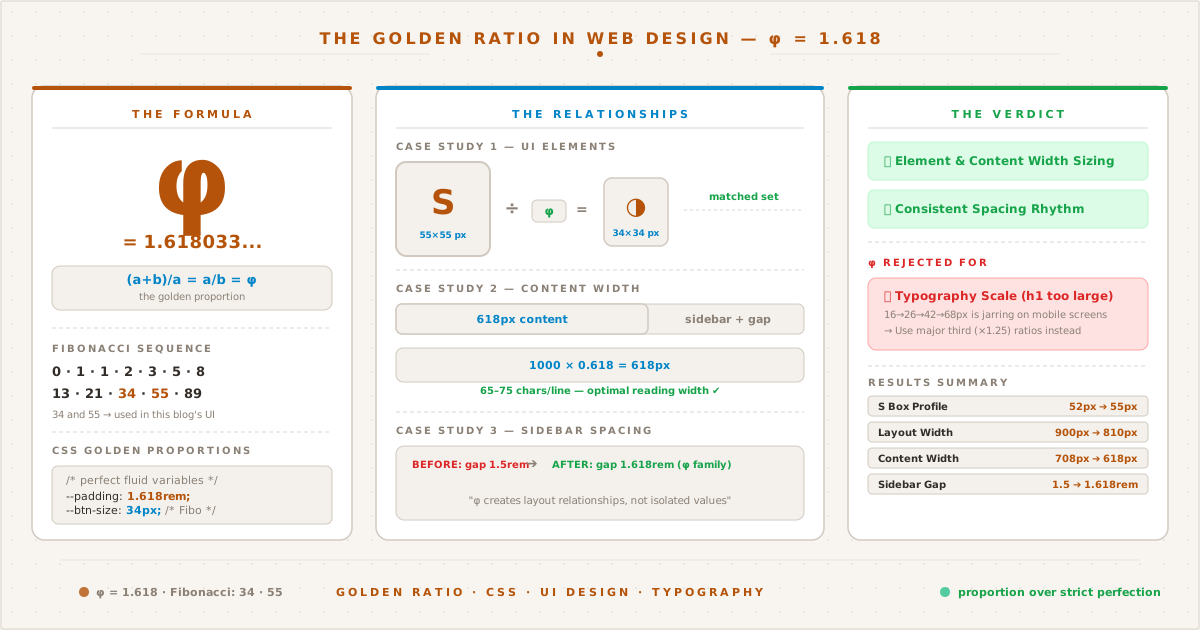
The golden ratio φ=1.618 applied to real blog components. Not every φ relationship survived — the verdict panel shows what stayed and what was rejected.
From Perfect Scores to Proportions#
The last two posts covered technical optimization — Eleventy v3 migration, Shiki syntax highlighting, PWA setup, and chasing a perfect 100/100 Lighthouse score. The site was fast, accessible, and standards-compliant. But something about it still felt assembled rather than composed.
At the time, the sidebar had an “S” monogram. Next to it (on mobile) or below it (on desktop) sat a theme toggle. They were both boxed elements with borders. But their sizes had no relationship to each other. The content area stretched to whatever width the browser gave it. Spacing values like 1.5rem and 2rem were chosen by eye, not by system.
This post is about applying the golden ratio (φ) to those decisions — what worked, what didn’t, and why the most famous proportion in design isn’t always the right answer.
What Is the Golden Ratio#
The golden ratio (φ, phi) is approximately 1.618. Two quantities a and b are in golden ratio if:
(a + b) / a = a / b = φ
Its geometric sibling is the Fibonacci sequence — 0, 1, 1, 2, 3, 5, 8, 13, 21, 34, 55, 89, 144 — where each number is the sum of the two preceding ones. The ratio between consecutive Fibonacci numbers converges toward φ.
φ appears in natural phenomena (sunflower spirals, nautilus shells, branching patterns) and has been used deliberately in art and architecture since antiquity — the Parthenon, the Great Pyramid, Renaissance paintings, and modern logos like Apple and Twitter.
In web design, φ shows up in four main areas:
| Area | How φ Applies | Example |
|---|---|---|
| Typography | Font sizes scaled by φ | 16 → 26 → 42px |
| Layout | Content-to-sidebar ratio | 618 : 382 (in a 1000px container) |
| Spacing | Margins and gaps as φ multiples | 1rem, 1.618rem, 2.618rem |
| Element sizing | Proportional dimensions | Button width = icon width × φ |
Each of these is worth examining — and some are worth challenging.
Myth-Busting: φ-based Typography#
The most common recommendation for applying φ to web design is the typographic scale: set your body text at 16px, then multiply by φ for each heading level:
- h4: 16 × 1.25 = 20px (common alternative using major third)
- h3: 16 × 1.618 = 26px
- h2: 26 × 1.618 = 42px
- h1: 42 × 1.618 = 68px
This scale is mathematically pure. It’s also a usability problem.
A 68px heading is enormous — nearly 4.25rem. Paired with a 16px body, the visual jump is jarring. The reader’s eye doesn’t glide from heading to paragraph; it vaults. On mobile, the situation is worse: 68px at 375px viewport width leaves no room for anything else on screen.
Most professional web typography uses more conservative scales:
| Scale | Multiplier | 16 → h3 → h2 → h1 |
|---|---|---|
| Golden ratio (φ) | 1.618 | 16 → 26 → 42 → 68 |
| Perfect fourth | 1.333 | 16 → 21 → 28 → 38 |
| Major third | 1.25 | 16 → 20 → 25 → 31 |
| This blog | custom | 16 → 22 → 28 → 36 |
This blog uses a scale closer to the perfect fourth, which produces headings that feel prominent without overwhelming the content. This isn’t a failure of φ — it’s a recognition that typographic scales serve readability, not mathematical elegance.
The lesson: φ works best for spatial relationships (spacing, proportions, dimensions), not for typographic hierarchy. Reserve φ for layout and elements; let typography follow the more forgiving major-third or perfect-fourth scales.
Case Study 1: The S Monogram & Theme Toggle#
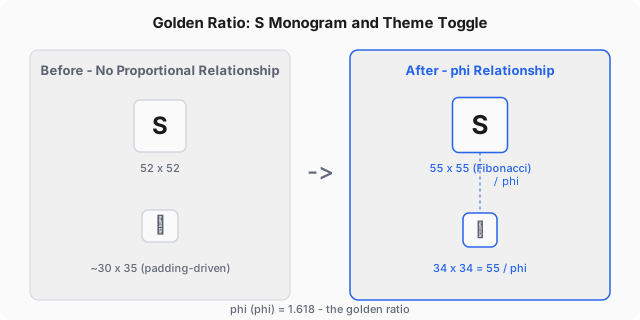
The first φ application targeted the “S” home link and the theme toggle in the sidebar. Before this change, they had no dimensional relationship — the S box was a rounded 52×52px, and the toggle’s size was determined entirely by its padding and font-size.
Before#
The “S” box was 52×52px — a rounded number chosen because it looked OK. The theme toggle had no explicit width or height; its box size was determined by padding: 0.4rem 0.6rem wrapped around the font-size: 1.1rem character. The resulting toggle box was approximately 30×35px — close to the S box, but not intentionally so.
/* Before */
.site-logo { width: 52px; height: 52px; }
.theme-toggle { padding: 0.4rem 0.6rem; font-size: 1.1rem; }The two elements shared a visual style (border, border-radius, background) but their sizes were independent. They looked like siblings, not a system.
After#
The S box was bumped to 55×55px — not an arbitrary round number, but a Fibonacci number. The sequence 1,1,2,3,5,8,13,21,34,55,89 means 55 is part of the same mathematical family as φ.
The theme toggle was then derived from the S box using φ:
toggle size = S box size / φ = 55 / 1.618 ≈ 34px
The toggle became a 34×34px box, with the (◑) character centered via flexbox. No padding needed — the box is the button.
/* After */
.site-logo { width: 55px; height: 55px; } /* Fibonacci */
.theme-toggle { width: 34px; height: 34px; /* 55 ÷ φ */
display: flex; align-items: center;
justify-content: center; padding: 0; }The relationship is visible: the toggle is exactly the S box shrunk by φ. They were no longer two unrelated boxes — they were a matched set with a proportional connection. (Both elements have since been redesigned in the terminal theme, but the φ relationship principle remains instructive.)
Practical Impact#
The 34×34 toggle is actually 4px taller than the old padding-based version (~30px). On desktop, it feels more substantial — a deliberate UI element rather than an afterthought. The 3px increase in the S box (52→55) is barely perceptible on its own, but the relationship it enables with the toggle makes the entire sidebar feel more intentional.
Case Study 2: Content Reading Width#
The most impactful φ application has nothing to do with decorative elements. It’s the reading width.
Optimal line length for web text is 45-75 characters per line. At a body font size of 16-18px, that translates to roughly 600-700px of content width. This blog’s desktop layout (900px container, 160px sidebar, 2rem gap) gave the content column approximately 708px — above the ideal range.
φ provides a natural number for this: 618px (1000 × 0.618, or 1/φ of 1000). Not coincidentally, 618px at 16-18px font size yields about 65-75 characters per line — right at the upper end of the optimal range.
/* Before */
.layout { max-width: 900px; }
/* Content width: ~708px (900 - 160 - 32) */
/* After */
.layout { max-width: 810px; } /* 618 + 160 + 32 */
article { max-width: 618px; } /* φ-based reading width */The layout container shrunk from 900px to 810px, ensuring the content column naturally lands at 618px without wasted space. The article max-width acts as a safeguard on wider screens.
The result: text that’s measurably more comfortable to read, anchored by a proportion that’s been recognized as optimal for centuries. This is φ doing what it does best — providing an empirically sound constraint that removes the burden of arbitrary decisions.
Case Study 3: Spatial Rhythm with φ#
The golden ratio shines brightest in spatial relationships — gaps, margins, and paddings between elements. On the original sidebar layout, elements were spaced with gap: 1.5rem and padding-right: 2rem separating it from the vertical border.
Both values were adjusted to φ-based numbers:
/* Before */
.sidebar { gap: 1.5rem; padding-right: 2rem; }
/* After */
.sidebar { gap: 1.618rem; padding-right: 1.618rem; }The gap increase from 1.5rem to 1.618rem is only about 2px — not visually transformative on its own. The padding-right decrease from 2rem to 1.618rem (~6px) is more noticeable, giving the content area a bit more breathing room.
These changes are subtle. Their value isn’t in the individual pixel shifts but in the consistency they create. Every spacing value in the sidebar came from the same φ family, forming a coherent vertical rhythm rather than a collection of individually-optimized numbers. The same φ-based spacing continues to be used in the current topbar, breadcrumb, and article layout.
A Note on Border Width#
One temptation was to scale the sidebar’s vertical border using φ: border-right: 1.618px solid var(--border). (The sidebar has since been replaced by a topbar, but the sub-pixel border lesson applies regardless.) Browsers don’t reliably render sub-pixel borders, and a 1.618px border looks identical to a 1px border in practice. The principle matters, but browser reality matters more.
Case Study 4: The Copy Button#
The copy-code button (the one that appears when you hover over a code block) was 32×32px — a standard UI size. After establishing the φ relationship between the S box (55px) and toggle (34px), the copy button was an outlier at 32px.
Updating it to 34px brings it into the same system:
/* Before */
.copy-btn { width: 32px; height: 32px; }
/* After */
.copy-btn { width: 34px; height: 34px; }A 2px increase on a button that’s only visible on hover. Is it noticeable? Barely. But it completes the system: the S box (55), toggle (34), and copy button (34) now share a proportional lineage.
Results Summary#
Here’s a before-and-after table of every φ-influenced change at the time (the sidebar and S monogram have since been replaced, but the φ ratios continue in the current layout):
| Element | Before | After | φ Basis |
|---|---|---|---|
| S box (desktop) | 52×52 | 55×55 | Fibonacci number |
| Theme toggle (desktop) | ~30×35 (padding) | 34×34 (flex) | 55 ÷ φ |
| Sidebar gap (desktop) | 1.5rem | 1.618rem | φ |
| Sidebar padding-right | 2rem | 1.618rem | φ |
| Layout max-width | 900px | 810px | 618 + sidebar + gap |
| Content reading width | ~708px | 618px | 1000 × 0.618 |
| Copy button | 32×32 | 34×34 | Match toggle system |
And one deliberate non-change:
| Area | Why φ Was Rejected |
|---|---|
| Typography scale | φ produces overly large headings (68px h1); major-third/perfect-fourth scales are more readable |
What This Taught Me#
Applying φ to a real project clarified something I’d only read about: φ is a tool for creating relationships, not a formula for generating values.
The best φ application on this blog is the content width (618px), because it solves a real problem (line length) with a smart constraint grounded in centuries of proportional thinking.
The most visible φ application is the S box / toggle relationship, because it transforms two independent elements into a connected system.
The weakest φ applications were the spacing adjustments (1.5rem → 1.618rem), because the difference is too small to register without measurement — though the consistency argument has merit.
The rejected φ application (typography) is the most instructive, because it proves that mathematical purity doesn’t always serve human readability.
The golden ratio is not a magic number that makes any design beautiful. It’s a proportion that, when applied intentionally to specific relationships, creates harmony. Applied indiscriminately, it creates noise — or worse, bad usability.
What’s Next#
This blog now has technical performance (100/100 Lighthouse) and proportional harmony (φ-based UI). The next frontier is content depth — more posts, more research, more stories.
As for the golden ratio: I’ll continue using it as a starting point for sizing decisions, comparing its output against visual judgment, and keeping it only where it improves the experience. That’s the right relationship with any design tool — including one that’s 2,500 years old.
Want to see the exact code changes? The full source is on GitHub — every CSS property and commit message is there.