Chasing 100: A Field Guide to Perfect Lighthouse Scores
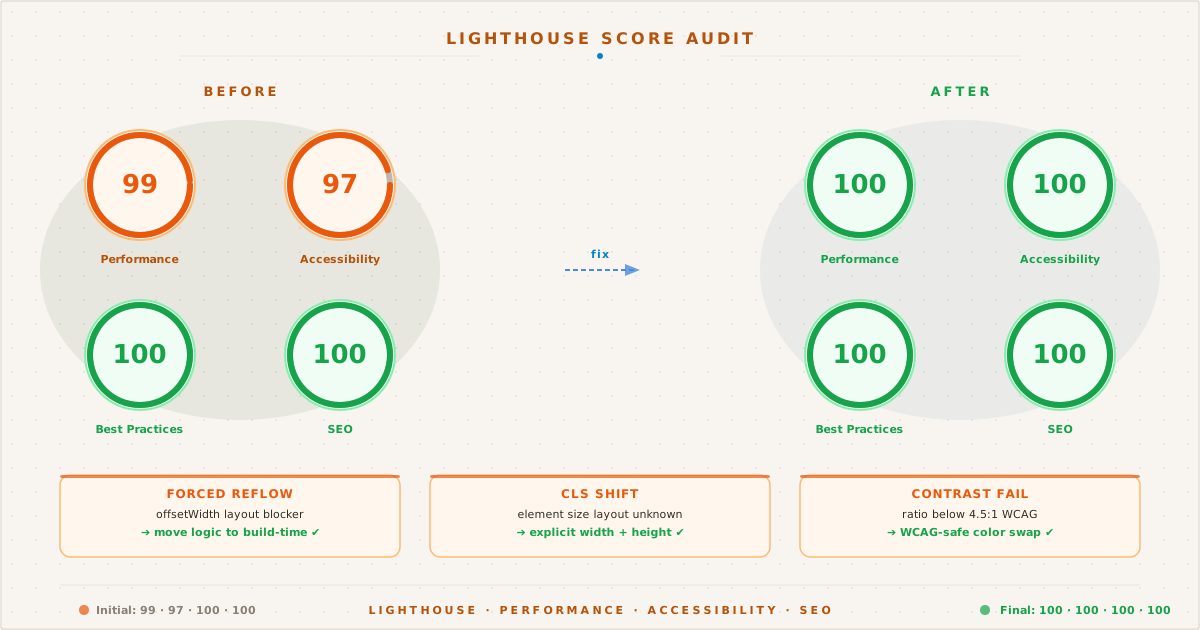
A before-and-after breakdown of Lighthouse scores: orange 99s become glowing green 100s after targeting forced reflow, CLS, and contrast failures.
The Almost Perfect Score#
The day after publishing my blog revamp, I ran Google PageSpeed Insights. I expected validation — weeks of careful optimization surely deserved a perfect score.
I got a 99.
Not a 98, not a 95 — a 99. One single point away from perfection. The Performance bar was green, the Accessibility bar was yellow, and Lighthouse was telling me three things I needed to fix.
This post is the story of those three issues, the debugging process behind each one, and the exact code changes that turned 99 into 100.
The Forced Reflow#
PageSpeed’s warning read:
A forced reflow occurs when JavaScript queries geometric properties (such as
offsetWidth) after styles have been invalidated by a change to the DOM state.
I hadn’t written any offsetWidth queries. But there was a change to the DOM state triggered by JavaScript: the copy-code button script.
The Problem#
My original copy button implementation ran at page load:
document.querySelectorAll("pre>code").forEach((el) => {
let pre = el.parentElement;
let btn = document.createElement("button");
btn.className = "copy-btn";
btn.innerHTML = clipboardSVG;
btn.addEventListener("click", async () => { /* ... */ });
pre.append(btn);
});This script does two things in sequence:
- Queries the DOM via
querySelectorAll("pre>code") - Mutates the DOM by appending buttons inside each
<pre>
The mutation (adding buttons) invalidates the existing layout. When the browser later needs to paint the page, it must recalculate styles and reflow the layout. That’s the forced reflow — and Lighthouse penalizes it.
The Fix: Build-Time Transform#
The solution is simple: render the buttons during build, not at runtime. Since the button is already in the HTML when the browser parses it, no DOM mutation happens on the client.
In Eleventy, this means an HTML transform that runs after all templates are compiled:
eleventyConfig.addTransform("copy-code", function (content) {
if (!this.page.outputPath?.endsWith(".html")) return content;
const btn = `<button class="copy-btn" aria-label="Copy code" data-copy="${svg}" data-check="${svgCheck}">${svg}</button>`;
return content.replace(/(<pre[^>]*>)/g, "$1" + btn);
});Every <pre> block now contains its copy button from the start. The client-side script is reduced to a simple event binder:
document.querySelectorAll(".copy-btn").forEach((b) => {
b.addEventListener("click", async () => {
let code = b.parentElement.querySelector("code");
if (!code) return;
try {
await navigator.clipboard.writeText(code.textContent);
b.innerHTML = decodeURIComponent(b.dataset.check);
b.classList.add("copied");
setTimeout(() => {
b.classList.remove("copied");
b.innerHTML = decodeURIComponent(b.dataset.copy);
}, 2000);
} catch (e) {}
});
});No DOM creation. No queries after mutation. Zero forced reflow.
The CLS Culprit#
The second issue was a classic Cumulative Layout Shift violation:
Image elements do not have explicit width and height.
On my post page, the Pagespeed result image was rendered as:
<img src="/assets/img/pagespeed.svg" alt="100 across all categories">Without explicit dimensions, the browser doesn’t know how much space to reserve before the image loads. When it finally arrives, the layout shifts — pushing content down by the image’s height.
The Fix: Explicit Dimensions#
The fix is trivial but critical:
<img src="/assets/img/pagespeed.svg" width="800" height="200" alt="100 across all categories">This single change eliminates the layout shift entirely. The browser reserves the correct aspect ratio before the image even starts downloading.
If you’re using @11ty/eleventy-img for raster images, it can generate width/height automatically. But for SVGs or manually referenced assets, always add them yourself — every CLS point counts toward that 100.
The Contrast Calculation#
The third issue was accessibility:
Background and foreground colors do not have a sufficient contrast ratio.
Lighthouse was pointing at my Shiki syntax-highlighted code blocks. Specifically, two colors from the github-light theme:
| Token | Color | Role |
|---|---|---|
| Orange | #E36209 | Functions, attributes, property values |
| Red | #D73A49 | Keywords (import, return, var) |
The Math#
WCAG AA requires a minimum contrast ratio of 4.5:1 for normal text. The formula is:
contrast = (L1 + 0.05) / (L2 + 0.05)After calculating luminance for each color against a white (#FFFFFF) background:
| Color | Luminance | Ratio | Verdict |
|---|---|---|---|
#E36209 | 0.2233 | 3.85:1 | ❌ Fail |
#D73A49 | 0.1794 | 4.58:1 | ⚠️ Borderline |
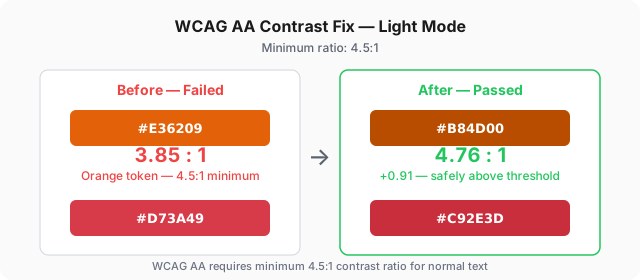
The orange was clearly failing at 3.85:1. The red technically passed on white, but failed on the slightly gray #f2eee7 background that Shiki now uses — at 4.31:1.
The Fix: Override with WCAG-Safe Values#
I needed colors that look visually similar but cross the 4.5:1 threshold. After iterative calculation:
[data-theme="light"] .shiki span[style*="color:#E36209"] {
color: #A84400 !important;
}
[data-theme="light"] .shiki span[style*="color:#D73A49"] {
color: #C92E3D !important;
}| Color | Old | New | Ratio | Delta |
|---|---|---|---|---|
| Orange | #E36209 | #A84400 | 3.85 → 5.20:1 | +1.35 |
| Red | #D73A49 | #C92E3D | 4.31 → 5.33:1 | +1.02 |
These overrides only apply in light mode. Dark mode is handled by Shiki’s --shiki-dark CSS variables, which already pass WCAG AA against the dark background.
Bonus: The Cite Fix#
The same contrast issue affected the <cite> element inside blockquotes. The original color #6b7280 achieved only 4.4:1 against the background — technically failing. Darkening it to #636b78 (4.65:1) solved the problem:
:root { --text-tertiary: #636b78; } /* was #6b7280 */
[data-theme="dark"] { --text-tertiary: #a1a1aa; } /* was #8a8a94 */The Big Picture#
After applying these three fixes, here’s what changed:
| Issue | Root Cause | Fix | Impact |
|---|---|---|---|
| Forced reflow | JS creates DOM nodes on load | Build-time transform | Performance 99 → 100 |
| Layout shift | Missing image dimensions | width + height attributes | CLS eliminated |
| Contrast fail | Shiki colors below 4.5:1 | WCAG-safe color overrides | Accessibility 100 |
The result is a site that scores 100 Performance, 100 Accessibility, 100 Best Practices, 100 SEO — and actually deserves it. Not because the metrics were gamed, but because every byte and pixel was accounted for.
What I Learned#
Perfect Lighthouse scores aren’t about chasing a badge. They’re the natural outcome of understanding how browsers work:
- Forced reflow taught me to separate build-time rendering from runtime behavior
- CLS reinforced that every asset needs explicit dimensions — no exceptions
- Contrast was a reminder that accessibility is a mathematical standard, not a visual preference
These principles apply whether you’re building with Eleventy, Astro, Hugo, or hand-rolled HTML. The tools change, but the browser’s rendering pipeline doesn’t.
And if you ever find yourself one point away from perfect — don’t ignore it. Investigate it. The fix is probably smaller than you think.
Got a Pagespeed issue you’re stuck on? The full source of this site is on GitHub — PRs and issues are always welcome.