Git Shallow Clone Headache: Pushing from a --depth 1 Repository
The Setup#
I work on my phone a lot. Termux on Android, SSH keys loaded, a portable dev environment that fits in my pocket. But disk space is tight, and mobile data is precious. So when I needed to clone a project repository, I reached for the obvious optimization:
git clone --depth 1 git@github.com:user/repo.gitThis downloads exactly one commit — the latest on the default branch. No history, no baggage, no wasted bytes. The repo landed on my phone in seconds.
I made my edits, committed them, and ran the familiar incantation:
git pushAnd hit a wall.
The Wall#
To github.com:user/repo.git
! [rejected] main -> main (non-fast-forward)
error: failed to push some refs to 'github.com:user/repo.git'
hint: Updates were rejected because the tip of your current branch
hint: is behind its remote counterpart.
hint: Integrate the remote changes (e.g. 'git pull ...') before pushing again.I stared at the screen for a moment. Behind? I just cloned this repo five minutes ago. I haven’t pulled anything. The remote and I should be in perfect sync. I am the latest commit.
Then the second hint caught my attention:
hint: See the 'Note about fast-forwards' in 'git push --help' for details.I ran git pull on instinct. That’s when things got weirder:
fatal: refusing to merge unrelated historiesThe Detective Work#
A “non-fast-forward” rejection means Git can’t find a shared ancestor between my local branch and the remote branch. It sees them as two independent histories — even though they started from the same commit only minutes ago.
The culprit was right there in my original clone command: --depth 1.
A shallow clone (--depth 1) downloads only the tip commit. The parent pointer still exists in Git’s object model, but the actual parent commit data — the blob, the tree, the author info — simply isn’t there. Your local Git knows of the parent, but doesn’t have it.
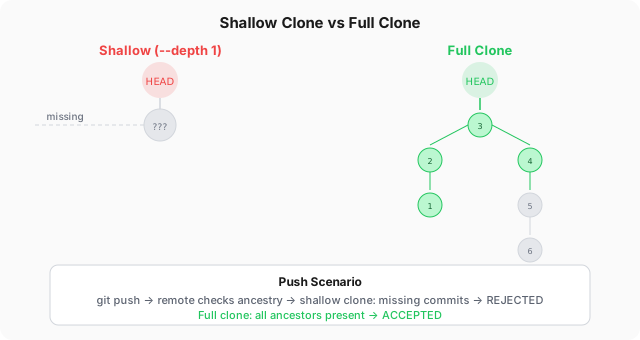
When you push, the remote performs an ancestry check on every commit in your local branch. If any ancestor is missing from the shallow graft, the remote can’t verify that your commit descends from its current tip. And without that assurance, it rejects the push outright. It’s not a permission issue — it’s a verification failure.
The git pull failed for the same reason: Git saw two histories (my shallow tip and the remote’s actual full history) with no shared commits in the local object store, and refused to merge what it perceived as unrelated lines of development.
The Fix#
The solution took exactly two commands:
git fetch --unshallow--unshallow converts a shallow repository to a complete one by fetching the full commit history. Git pulls down every missing ancestor from the remote, one by one, until your local history is contiguous and complete.
The download size depends on the repository’s history depth. For a project with years of commits, this could be significant — which is exactly why you used --depth 1 in the first place. But there’s no way around it: if you need to push, the remote needs to see the full ancestry chain.
Once the history is fully populated:
git pull --rebase
git pushThe --rebase flag replays your local commits on top of the remote’s current tip, producing a clean linear history. Then git push passes the ancestry check without complaint.
A Lighter Alternative#
If space or bandwidth is still a concern, you don’t need --depth 1. You can compromise:
git clone --depth 50 git@github.com:user/repo.gitFifty commits of history is enough for Git’s ancestry check to succeed in most workflows, while still saving significant bandwidth compared to a full clone. For small personal projects, --depth 10 is often sufficient.
Or, if you’ve already made the shallow clone and are about to push, you can fetch just enough history to satisfy the remote:
git fetch --depth=100
git pull --rebase
git pushThis fetches 99 more ancestors — fewer than a full --unshallow, but enough for the ancestry check to pass.
The Lesson#
Debugging this taught me something about Git’s internals that a full-clone developer might never encounter. The shallow clone isn’t just an optimization — it fundamentally changes how Git can interact with the remote. The --depth flag is not a “download less” shortcut; it’s a constraint on Git’s ability to verify your work.
My rule of thumb now:
| Scenario | Clone strategy |
|---|---|
| Read-only, just browsing | --depth 1 |
| Quick edit, no other devices involved | --depth 50 |
| Full development, will push | No depth limit |
| CI/CD or build pipeline | --depth 1 |
And if I ever forget and get that rejection again: git fetch --unshallow is the key. Not git pull. Not git push --force. --unshallow, then rebase, then push.
Memorized now.
This blog is my personal notebook as much as it is a publication. If this post saves you from the same hour of head-scratching, it’s done its job. The full source is on GitHub.