DIY Draft System for Eleventy v3
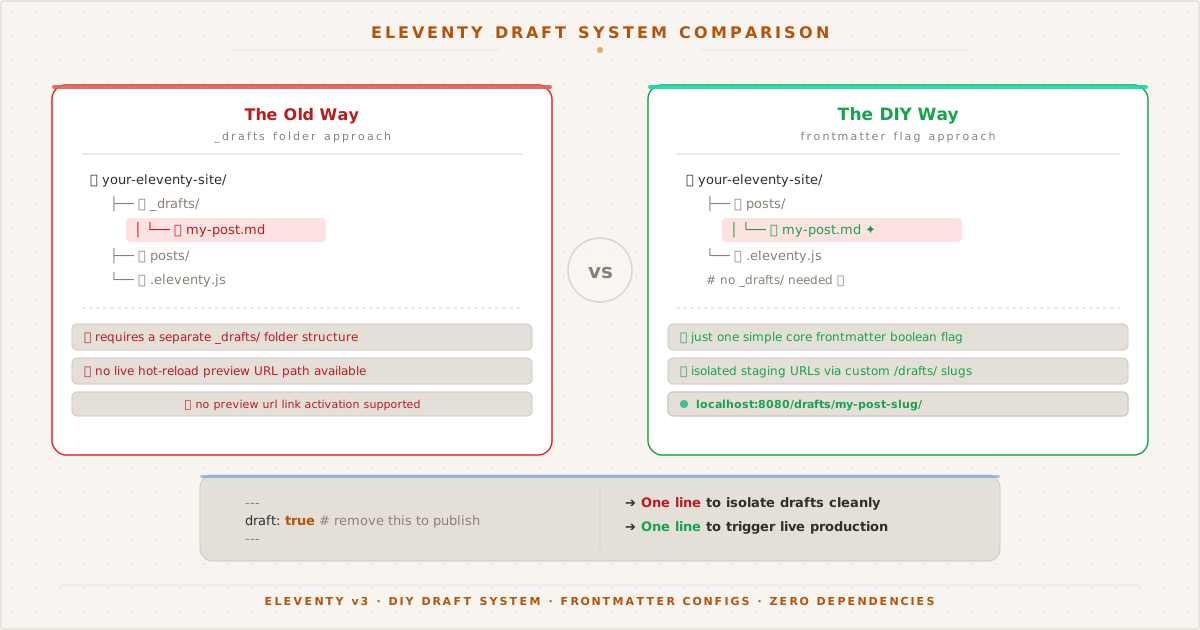
Two approaches to Eleventy drafts: the traditional _drafts folder with extra config, and the frontmatter flag approach with live preview URLs and zero plugins.
The Problem#
Every blogging platform has drafts — unpublished posts that only the author can see. WordPress has them, Ghost has them, even Jekyll has published: false. But Eleventy v3? Nothing built-in.
In Eleventy v2, you could rely on the future option to skip posts with future dates. In v3, that option doesn’t exist. Every post in your content/ directory is fair game, regardless of its date.
This became painfully obvious when I scheduled a post for tomorrow, deployed, and found it live immediately. A blog without draft support is a blog where every mistake is instantly public.
The Requirements#
I wanted a draft system that checks three boxes:
- Zero public visibility — drafts must not appear in any list, feed, tag page, or sitemap
- Previewable — I should be able to visit a draft’s URL directly to proofread
- One-step publish — no file moving, no folder renaming, just flip a switch
The Implementation#
Eleventy v3 provides all the hooks you need. The solution uses two official APIs working together.
Step 1: Conditionally Reroute the Permalink#
The permalink function in a data file can access frontmatter. When draft: true, we route the post to a /drafts/ path instead of /posts/:
// content/posts/posts.11tydata.js
export default {
tags: ["posts"],
layout: "layouts/post.njk",
permalink: ({ draft, page }) =>
draft ? `/drafts/${page.fileSlug}/` : `/posts/${page.fileSlug}/`,
// ...
};This means a draft lives at /drafts/my-post/ while a published post lives at /posts/my-post/. The URL changes automatically when you toggle the draft flag.
Step 2: Exclude from All Collections#
The eleventyExcludeFromCollections property removes an item from every single collection — the posts collection, tag-specific collections like collections.eleventy, and even collections.all. Without this, a draft would still appear on tag pages and in the RSS feed.
But eleventyExcludeFromCollections is a static boolean. To make it dynamic based on frontmatter, we use eleventyComputed:
// content/posts/posts.11tydata.js
export default {
// ...
eleventyComputed: {
eleventyExcludeFromCollections: ({ draft }) =>
draft ? true : undefined,
ignore: ({ draft }) =>
draft ? true : undefined,
},
};The function returns true only when draft: true. Otherwise it returns undefined, leaving the default behavior intact.
Step 3: Prevent Search Engine Indexing#
A draft at /drafts/slug/ is accessible to anyone who knows the URL. Without protection, a search engine that finds the URL (via an external referrer or direct link) could index it before you’re ready to publish.
Eleventy’s eleventyExcludeFromCollections only hides drafts from your site’s navigation — it doesn’t tell search engines to stay away. For that, we need a <meta name="robots" content="noindex"> tag in the <head> of draft pages.
The blog’s layout template (base.njk) already has this:
{% if ignore %}<meta name="robots" content="noindex">{% endif %}The missing piece is setting ignore: true on draft pages. We wire it through the same eleventyComputed block:
// content/posts/posts.11tydata.js
export default {
// ...
eleventyComputed: {
eleventyExcludeFromCollections: ({ draft }) =>
draft ? true : undefined,
ignore: ({ draft }) =>
draft ? true : undefined,
},
};Now every draft page outputs <meta name="robots" content="noindex">. Published pages don’t — the variable is undefined, so {% if ignore %} evaluates to false and the tag is omitted.
This is defense in depth: no internal links, no sitemap entry, and an explicit noindex directive. Search engines would have to discover the URL externally and deliberately ignore the noindex tag to index a draft.
The Complete Data File#
Here’s the full posts.11tydata.js that powers every post on this site:
export default {
tags: ["posts"],
layout: "layouts/post.njk",
permalink: ({ draft, page }) =>
draft ? `/drafts/${page.fileSlug}/` : `/posts/${page.fileSlug}/`,
eleventyComputed: {
eleventyExcludeFromCollections: ({ draft }) =>
draft ? true : undefined,
ignore: ({ draft }) =>
draft ? true : undefined,
},
};Twelve lines. No plugins. No external dependencies.
How Publishing Works#
To write a new draft, add draft: true to the frontmatter:
---
title: "My Upcoming Post"
date: 2026-06-20
draft: true
tags: [some-topic]
---When you build or deploy, the post is:
| Aspect | Behavior |
|---|---|
| File location | /drafts/my-upcoming-post/ |
| Homepage | Hidden |
| Tag pages | Hidden |
| RSS feed | Hidden |
| Next/prev nav | Hidden |
| Sitemap | Hidden |
| Direct URL access | ✅ Works |
| Search engine indexing | noindex via <meta name="robots"> |
To publish, delete the draft: true line, commit, and push:
git add content/posts/my-upcoming-post.md
git commit -m "Publish: My Upcoming Post"
git pushThe post moves from /drafts/ to /posts/ and appears everywhere it should. No files to move, no folders to rename, no config toggles to remember.
Why Not _drafts Folder?#
Eleventy v3 (and v2) automatically ignores any directory starting with an underscore. A content/_drafts/ folder works without any configuration — files inside it are never processed.
But the folder approach has tradeoffs:
| Aspect | _drafts/ folder | draft: true frontmatter |
|---|---|---|
| Setup | Zero config | 12 lines in data file |
| Preview | Impossible (no URL) | ✅ /drafts/slug/ |
| SEO safety | Not rendered — no risk | noindex via eleventyComputed |
| Publish | git mv between folders | Delete one line |
| Content organization | Split across two folders | All posts in one place |
| Accidental publish | File move = publish risk | Toggle is explicit |
For a blog where I write on my phone and want to preview before publishing, the frontmatter approach wins. The preview URL alone saves me from countless broken drafts.
What About Scheduled Publishing?#
The current system requires a manual step to publish. For automated scheduling — write a post, set a date, and have it go live automatically — you’d need a CI/CD cron job that checks dates and conditionally removes draft: true.
That’s possible with GitHub Actions, but it adds complexity. For now, a manual git push on the publish date is a ritual I don’t mind. There’s something satisfying about flipping the switch yourself.
This entire site is open source on GitHub. The draft system is in content/posts/posts.11tydata.js — fork it, tweak it, make it yours. Complementary reading: the pinning framework that pairs with this draft system.