PWA with Vanilla JS: Why I Ditched Workbox for a 1KB Service Worker
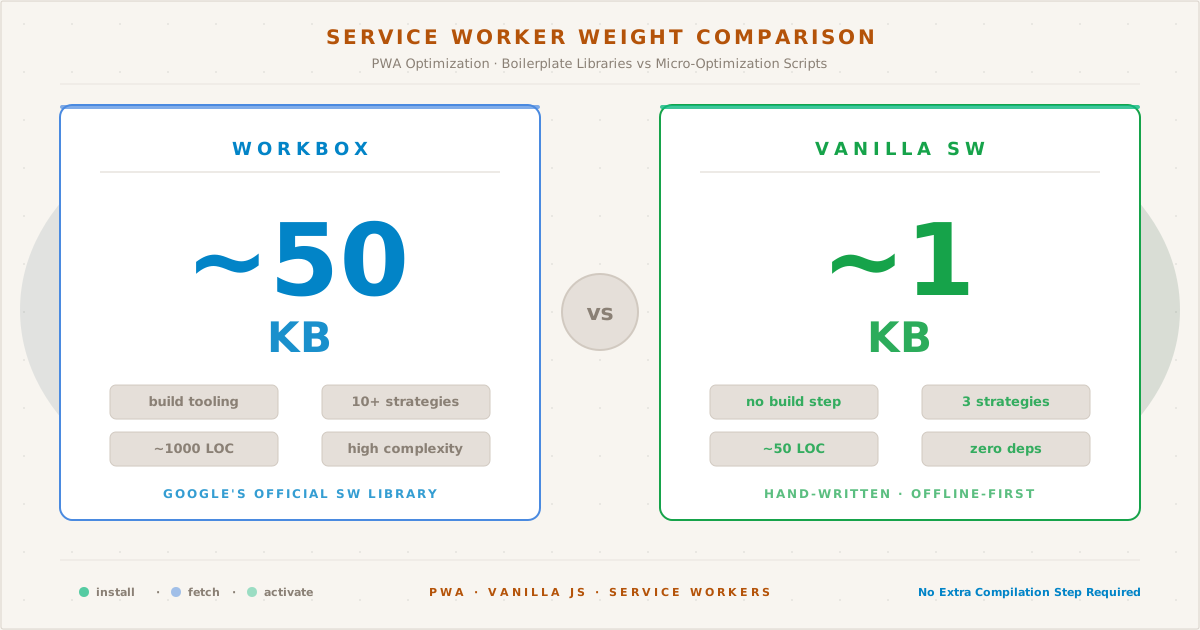
A 50KB framework vs 1KB of vanilla JavaScript — the size difference tells you everything about the tradeoffs between Workbox and a hand-written service worker.
A Progressive Web App needs three things: HTTPS, a manifest, and a service worker. The first two are straightforward. The service worker — that’s where opinions diverge.
The conventional wisdom says: use Workbox. It handles caching strategies, precaching, routing, and cleanup. It’s Google-backed, battle-tested, and integrates with every major build tool.
I chose to write mine from scratch.
Not because Workbox is bad — it’s excellent. But for a static site with a handful of pages and assets, a vanilla service worker is simpler, smaller, and more instructive. This post covers the architecture, the strategies, and the bugs I encountered along the way.
The Architecture#
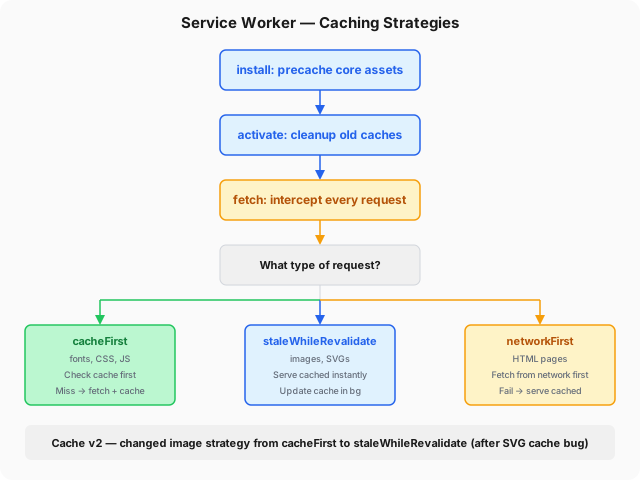
My service worker (at /sw.js) is about 80 lines of JavaScript. It defines three caching strategies based on request type:
const CACHE = "v2";
self.addEventListener("install", (e) => {
e.waitUntil(
caches.open(CACHE).then((cache) =>
Promise.allSettled(
["/", "/about/"].map((url) =>
fetch(url).then((r) => { if (r.ok) cache.put(url, r); })
)
)
)
);
self.skipWaiting();
});
self.addEventListener("activate", (e) => {
e.waitUntil(
caches.keys().then((keys) =>
Promise.all(keys.filter((k) => k !== CACHE).map((k) => caches.delete(k)))
).then(() => self.clients.claim())
);
});
self.addEventListener("fetch", (e) => {
if (e.request.destination === "font" || e.request.destination === "style") {
e.respondWith(cacheFirst(e.request));
} else if (e.request.destination === "document") {
e.respondWith(networkFirst(e.request));
} else if (e.request.destination === "image") {
e.respondWith(staleWhileRevalidate(e.request));
} else {
e.respondWith(cacheFirst(e.request));
}
});Three functions, one decision tree. That’s the entire service worker.
Strategy 1: cacheFirst — Fonts and Styles#
Font files and CSS never change between deploys (they’re versioned by the build), so there’s no reason to hit the network every time:
async function cacheFirst(req) {
let cached = await caches.match(req);
if (cached) return cached;
let res = await fetch(req);
if (res.ok) {
let cache = await caches.open(CACHE);
cache.put(req, res.clone());
}
return res;
}- Check cache → hit? return immediately
- Miss? fetch from network → cache the response → return it
This is the fastest strategy for immutable assets. The IBM Plex Sans variable font (woff2, ~120KB) loads from cache on every page after the first visit — zero network latency.
Strategy 2: staleWhileRevalidate — Images#
Images are the trickiest case. They’re mostly immutable, but occasionally updated (like the SVGs in posts). And they should feel instant:
async function staleWhileRevalidate(req) {
let cached = await caches.match(req);
let fetchPromise = fetch(req).then((res) => {
if (res.ok) {
caches.open(CACHE).then((cache) => cache.put(req, res.clone()));
}
return res;
});
return cached || fetchPromise;
}This was changed from cacheFirst after the SVG cache bug — the topic of a separate post. With staleWhileRevalidate:
- Return the cached response immediately (instant)
- In the background, fetch the latest version
- Update the cache for next time
The user always sees something. If the cache is stale by a few minutes, it’s fine — the next visit gets the fresh version.
Strategy 3: networkFirst — Documents#
HTML pages should always show the latest content. The blog is updated via deploys, and a cached index page with missing posts is a bad experience:
async function networkFirst(req) {
try {
let res = await fetch(req);
if (res.ok) {
let cache = await caches.open(CACHE);
cache.put(req, res.clone());
}
return res;
} catch {
let cached = await caches.match(req);
return cached || new Response("Offline", { status: 503 });
}
}- Try the network first → success? cache + return
- Network fails (offline) → serve cached version
- No cache and offline → 503
This ensures readers always see fresh content when online, but never see a blank page when offline. The catch is the safety net.
The Service Worker Lifecycle#
Understanding the lifecycle was the hardest part. A service worker goes through three phases:
- Install — fires once when the SW is first registered or updated. Precache assets here.
- Activate — fires after install, once the old SW is no longer controlling clients. Clean up old caches here.
- Fetch — fires on every network request from pages controlled by this SW.
The trickiest detail: by default, a new service worker waits for all pages running the old one to close before taking control. That’s why the install handler calls self.skipWaiting() — it activates immediately. Then self.clients.claim() in the activate handler tells the new worker to take control of all open pages right away.
skipWaiting is safe here because it’s a static blog — no persistent state between page loads. In a dynamic app with session data, test carefully.
There is a tradeoff I didn’t anticipate: clients.claim() triggers a Chromium bug that can evict bfcache entries, causing stale theme states on back-navigation. I documented the full debugging trail in The Theme That Couldn’t Remember.
Versioning with Cache V2#
Every time the service worker script changes, the browser treats it as a new version. The install event fires again, and the activate handler cleans up old caches:
const CACHE = "v2";
self.addEventListener("activate", (e) => {
e.waitUntil(
caches.keys().then((keys) =>
Promise.all(
keys.filter((k) => k !== CACHE).map((k) => caches.delete(k))
)
).then(() => self.clients.claim())
);
});When I bumped from v1 to v2 (after the SVG cache bug), the old cache was automatically purged. No user action needed, no stale assets lingering.
The install handler also changed: instead of cache.addAll() — which fails atomically if any URL returns a non-2xx — it uses fetch() + cache.put() wrapped in Promise.allSettled(). A temporary CDN blip on one asset no longer takes down the entire install.
The 1KB Payload#
The minified service worker is 1,024 bytes — roughly 1/50th of Workbox’s minimum bundle. Here’s what that means:
| Metric | Workbox | Vanilla |
|---|---|---|
| Bundle size | ~50KB [1] | ~1KB |
| Parse time | ~5ms [2] | ~0.1ms |
| Strategies | 10+ | 3 |
| Lines of code | ~1000 | ~50 |
| Learning curve | High | Low |
For a complex app with dynamic routes, Workbox’s routing and precaching abstractions are invaluable. For a static blog with three asset types, the overhead isn’t justified.
The Registration Pattern#
Registration is a few lines in the <script> tag at the bottom of the page:
navigator.serviceWorker &&
navigator.serviceWorker.register("/sw.js")
.catch(e => console.warn("SW:", e));The navigator.serviceWorker guard prevents errors in browsers without SW support (Safari before 11.3, some older mobile browsers). The .catch() handles environments where registration might reject — crawlers, restricted contexts, or a service worker file that failed to parse — without throwing an uncaught promise rejection. The path /sw.js is at the root scope, meaning it controls the entire site.
What I Learned#
- Network-first for documents, cache-first for assets, stale-while-revalidate for images. That’s 90% of PWA caching wisdom compressed into one sentence.
- Stale is better than nothing. A slightly outdated cached page is infinitely better than an offline error.
- Cache versioning is essential. Without it, updating assets silently fails — the old cache serves them forever.
- Workbox is for apps. For content sites, vanilla is cleaner.
- The biggest bug was the simplest. The SVG cache issue happened because I chose the wrong strategy for images. It wasn’t a framework bug or a browser bug — it was a logic error in a three-line function.
The full service worker code is on GitHub if you want to see it in context. It’s shorter than this post.