Git Interactive Rebase: Cleaning Up Your Commit Mess Before Push
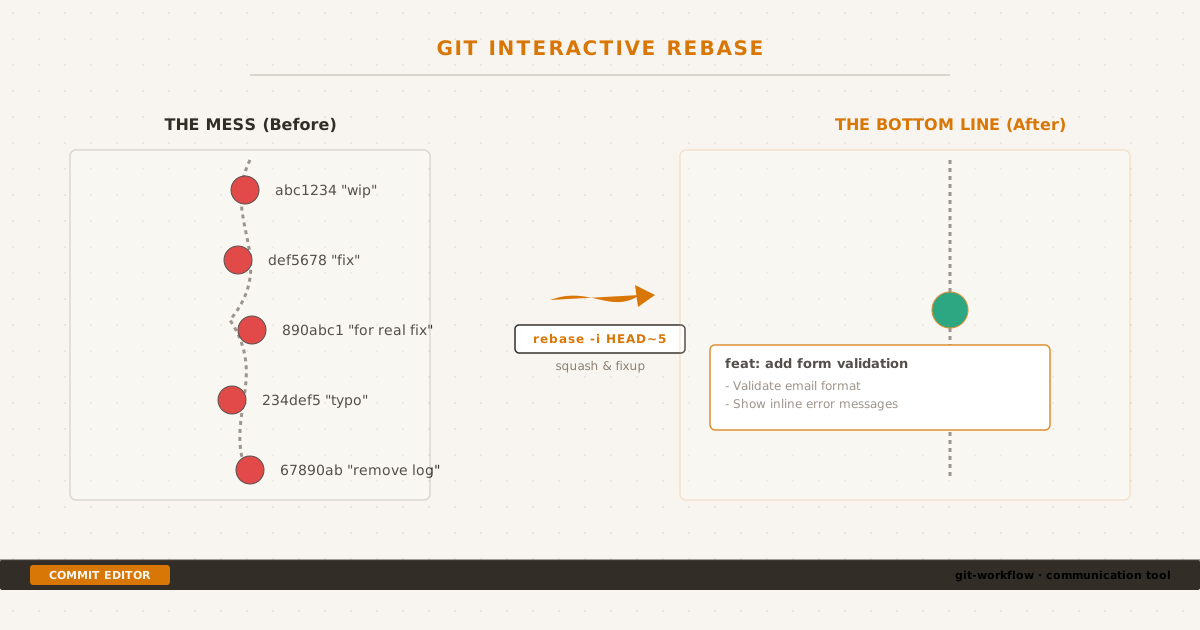
Local commit history cleanup: Condensing debugging diary noise into a single logical change before push.
The Mess#
Writing perfect commits from the start sounds nice in theory. In practice, my workflow looks more like a first draft that needs editing:
git commit -m "wip"
git commit -m "fix"
git commit -m "actually fix for real"
git commit -m "typo"
git commit -m "remove console.log"Five commits, one logical change. The tests pass, the feature works, but the commit history reads like a debugging diary. If you’re working alone on a feature branch, this is fine — until it’s time to push, open a PR, and ask someone else to review your work.
A reviewer sees five commits and has to ask: “Which one is the actual change? What’s the final state?” Worse, if the project uses git bisect or automated changelogs, each of those five commits is a noise signal.
This is where interactive rebase comes in.
What Interactive Rebase Does#
Interactive rebase lets you edit a series of commits before they become permanent history. Think of it as a “commit editor” — you see a list of your recent commits and decide what each one should be:
git rebase -i HEAD~5This opens an editor showing the last five commits:
pick abc1234 wip
pick def5678 fix
pick 890abc1 actually fix for real
pick 234def5 typo
pick 67890ab remove console.log
# Commands:
# p, pick = use commit
# r, reword = use commit but edit message
# s, squash = combine with previous commit
# f, fixup = combine, discard message
# d, drop = remove commitFrom here, I can reshape these five noise commits into one clean commit:
pick abc1234 wip
squash def5678 fix
squash 890abc1 actually fix for real
squash 234def5 typo
squash 67890ab remove console.logAfter rebase, Git pauses and asks for a combined commit message:
feat: add form validation with real-time feedback
- Validate email format on blur
- Show inline error messages
- Disable submit until all fields passOne commit. Clear message. Reviewer opens it and immediately understands what happened.
The Four Commands You’ll Actually Use#
Interactive rebase offers more options than you’ll ever need day-to-day. These four cover 95% of use cases:
pick — use the commit as-is. Default action, no change.
reword — keep the changes, rewrite the message. Use when the code is right but the message is meaningless (“fix bug” → “fix: handle empty input in search query”).
squash — combine this commit into the one above it and merge both messages. Use for “fixup after review” or “oops, forgot this file” commits.
fixup — like squash but discards this commit’s message entirely. Use when the commit message adds no value (“typo”, “remove debug log”, “lint fix”).
A practical workflow looks like this during a feature:
pick 1a2b3c feat: add user search endpoint
fixup 4d5e6f lint fix
fixup 7a8b9c remove debug logging
fixup 0d1e2f address PR feedbackResult: one feature commit with a clean message. No trace of the five-commit mess.
Reordering and Dropping#
You can also reorder lines in the rebase editor. Just move the lines around. This is useful when you have commits that logically belong in a different order, or when you want to group related changes together before squashing.
pick 1111 config: add API rate limit
pick 2222 ui: add loading spinner
pick 3333 feat: implement search
pick 4444 ui: style search resultsReorder to group by layer:
pick 1111 config: add API rate limit
pick 3333 feat: implement search
pick 2222 ui: add loading spinner
pick 4444 ui: style search resultsdrop removes a commit entirely. Use sparingly — if you need to drop a commit that’s already been pushed, make sure nobody else depends on it. I only use this for commits I know are wrong — test commit on the wrong branch, accidentally committed debug file.
When NOT to Rebase#
This is the most important rule in the entire post:
Never rebase commits that have been pushed to a shared branch.
Rebase rewrites history. If someone else has based work on top of your commits, rewriting them creates divergence that git pull can’t resolve cleanly. The golden rule:
| Branch type | Safe to rebase? |
|---|---|
| Local feature branch, not pushed | Always |
| Your own fork / personal branch | If nobody else pulled it |
| Shared feature branch with teammates | Never |
main / master / production branch | Absolutely never |
If you need to update a shared branch, use git merge instead. Rebase is a local cleanup tool, not a collaboration tool.
Rebase and Force Push#
When you rebase a branch that’s already been pushed (your own, not shared), the next push will be rejected:
! [rejected] feature/login -> feature/login (non-fast-forward)This is expected — rebase rewrote commit hashes, so Git sees a different history. The fix:
git push --force-with-lease--force-with-lease is safer than --force. It checks that nobody else has pushed to the branch since your last fetch. If they have, the push is rejected — preventing accidental overwrite of someone else’s work. Make this your default:
git config --global push.default current
git config --global alias.pushf "push --force-with-lease"The ! [rejected] (non-fast-forward) error can also appear for a different reason — a shallow clone with --depth 1 that truncated the commit history. If you see this error without having rebased, the cause might be missing upstream context. See Git Shallow Clone Headache for that scenario.
Real-World Rebase Conflicts#
Rebase replays each commit one at a time. If a conflict occurs, Git pauses on the conflicting commit:
git rebase --continue # after resolving conflicts
git rebase --skip # skip this commit entirely
git rebase --abort # go back to before rebase startedUnlike merge conflicts, rebase conflicts require you to resolve each commit independently. This sounds harder but produces a cleaner result — each commit compiles and makes sense on its own.
My rule: if I hit more than two conflicts during a rebase, I abort and use git merge instead. The conflicts tell me the branches have diverged too far for linear replay to be practical.
My Daily Workflow#
Here’s what my Git session actually looks like during a typical feature:
# 1. Work freely, commit whenever
git commit -m "wip"
git commit -m "fix validation"
git commit -m "oops forgot the error component"
# 2. Before pushing, clean up
git rebase -i main
# 3. In the editor:
# pick wip
# fixup fix validation
# fixup oops forgot the error component
# → reword to "feat: add form validation"
# 4. Force push my branch
git push --force-with-leaseThe result: one focused commit per logical feature, a linear history on the remote, and a reviewer who doesn’t have to wade through “wip” messages.
Do This, Not That#
| Instead of | Do this |
|---|---|
git commit -m "fix" five times | Commit freely, then rebase -i before push |
git merge to sync with main on your branch | git rebase main for linear history |
git push --force | git push --force-with-lease |
| Preserving every intermediate commit | fixup / squash into logical units |
| Rebasing main | Don’t. Ever. |
The Bottom Line#
Interactive rebase is the closest thing Git has to an “undo for commits.” It lets you write a messy first draft of your history, then edit it into something presentable before anyone else sees it.
The commit history you push is not your debugging diary — it’s a communication tool for your team and your future self. Treat it like one.
This post is part of my ongoing attempt to write down the Git workflows I wish someone had explained to me earlier. The full source is on GitHub.