The Plugin That Was Never Running
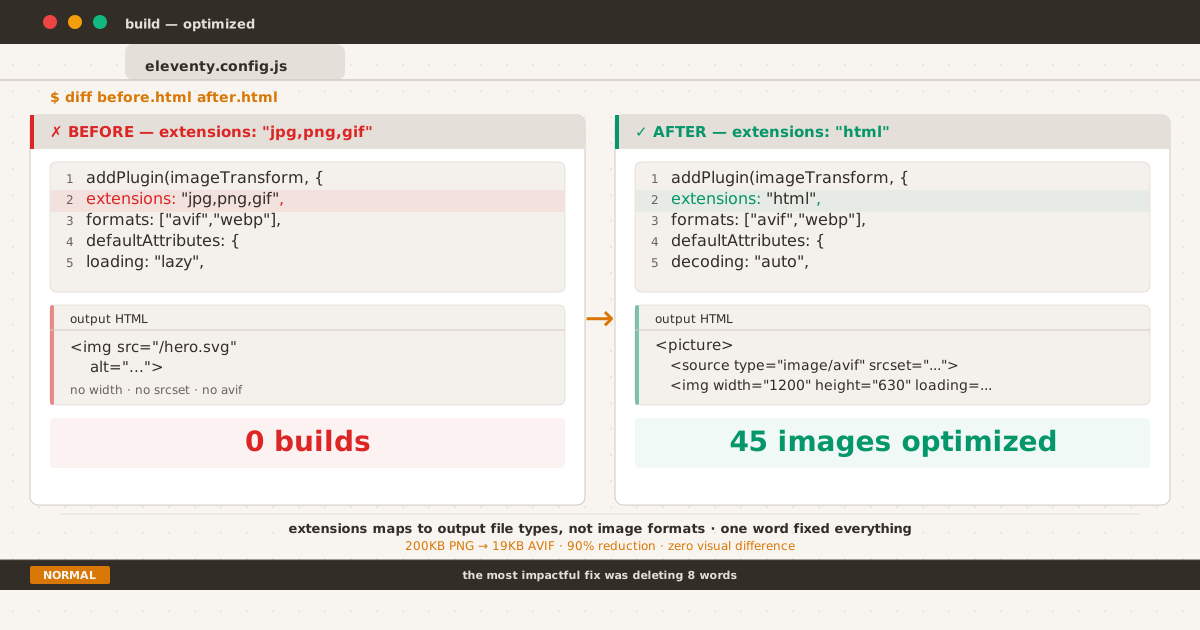
Before and after: bare <img> tag vs <picture> with AVIF sources and dimensions
The Silent Failure#
I was debugging a Lighthouse score when something caught my eye in the Network tab: images loading at their original sizes. No WebP, no AVIF, no resizing — every file served exactly as stored on disk. The Elements panel confirmed it: the <img> tags were untouched, as if the image plugin didn’t exist.
<img src="/assets/img/hero.svg" alt="A terminal-themed header image">No width. No height. No loading="lazy". No srcset. No WebP. No AVIF. Just a bare, untouched <img> tag silently making its way to production. Again. And again. And again.
The plugin wasn’t working. And worse — it had never worked.
How We Got Here#
The setup looked textbook. In eleventy.config.js, I registered the transform plugin, specified output formats, and set default attributes:
eleventyConfig.addPlugin(eleventyImageTransformPlugin, {
extensions: "jpg,jpeg,png,gif,webp,avif",
formats: ["avif", "webp"],
defaultAttributes: {
loading: "lazy",
decoding: "async",
},
});Everything seemed fine. The build succeeded. Browsers rendered images. No errors, no warnings, no nothing.
I didn’t think about it again.
That was months ago.
The Suspicion#
What tipped me off? I was inspecting the Network tab in DevTools and noticed images loading at their original sizes — no WebP, no AVIF, no resizing. Hero images, SVGs in diagrams, screenshots in posts — every single one was being served as-is.
I opened the Elements panel. The <img> tags were untouched. No width. No height. No srcset. The plugin’s promise of automatic optimization — generating multiple formats, adding responsive resolutions, injecting lazy loading — had left zero trace in the output.
Something was wrong.
Reading the Source Code#
This is the part where most tutorials stop and say “check your config.” But my config looked correct. So I did what any desperate developer does: I read the plugin’s source code.
The key insight lives in transform-plugin.js:203:
eleventyConfig.htmlTransformer.addPosthtmlPlugin(options.extensions, posthtmlPlugin, {
priority: -1,
});The options.extensions parameter is passed to addPosthtmlPlugin. And addPosthtmlPlugin calls HtmlTransformer._add() which works like this:
// HtmlTransformer.js:77
let extensionsArray = (extensions || "").split(",");
for (let ext of extensionsArray) {
target[ext].push({ fn: plugin, ... });
}It registers the PostHTML plugin per file extension. The extensions parameter determines which output file types the plugin should process.
My extensions was "jpg,jpeg,png,gif,webp,avif".
That means the plugin was registered to run on output files named something.jpg, something.png, etc. But all my template output is .html. None of my pages end in .jpg. The plugin was registered for extensions that never exist in the output.
The PostHTML plugin was sitting there, warm and ready, but no post office ever delivered a letter to its address.
The correct value — the default value, in fact — is "html". Every image on every page would have been processed if I had just let the default stand.
// This is what the default looks like in the plugin source:
options = Object.assign({
extensions: "html", // ← this!
...
}, options);But since I passed extensions: "jpg,jpeg,png,gif,webp,avif", my override won. And the plugin lost.
Plot Twist: The Path Problem#
After fixing the extensions, I rebuilt the site expecting to see optimized images everywhere. Instead, I got this:
[11ty] Problem writing Eleventy templates:
[11ty] 1. ENOENT: no such file or directory, stat 'content/favicon.svg'The plugin was running now — and immediately crashing on the favicon.
Here’s why. The plugin resolves image paths using normalizeImageSource, which does this for absolute paths:
return path.join(input, src);Where input is my Eleventy input directory (content/) and src is the image URL from the markup (e.g., /favicon.svg). On POSIX, path.join('content/', '/favicon.svg') produces content/favicon.svg. But my favicon lives at content/assets/img/favicon/favicon.svg. The path didn’t exist.
The root cause wasn’t the plugin — it was my directory structure. I had placed assets/ at the project root, outside the Eleventy input directory:
/
├── assets/ ← outside input directory
│ ├── img/
│ └── css/
└── content/ ← Eleventy input directoryThis works fine for passthrough copy and is a common pattern in older Eleventy projects. But the image transform plugin expects images to be inside the input directory, so it can resolve their paths relative to dir.input.
The Fix#
The solution was simple: move assets where they belong.
mv assets/ content/assets/Then update the references in config:
| What | Before | After |
|---|---|---|
| Passthrough fonts | "assets/fonts" | "content/assets/fonts" |
| Passthrough favicon | "assets/img/favicon" | "content/assets/img/favicon" |
| Passthrough images | "assets/img" | "content/assets/img" |
| CSS include | {% include "assets/css/index.css" %} | {% include "content/assets/css/index.css" %} |
| SVG transform | readFileSync(src) | readFileSync("content/" + src) |
I also had one post that referenced /favicon.svg directly — a typography test post using the favicon as an example image. I changed it to /assets/img/favicon/favicon.svg so the plugin could resolve it.
The new structure follows Eleventy’s conventions:
/
└── content/ ← input directory
├── assets/
│ ├── css/
│ ├── fonts/
│ └── img/
│ ├── favicon/
│ ├── og/
│ ├── posts/
│ └── ...
├── posts/
├── about/
└── ...The Moment of Truth#
Clean build. No errors. And then I saw it:
[11ty/eleventy-img] 45 images optimized
[11ty] Copied 77 Wrote 73 files in 44.29 seconds (606.7ms each, v3.1.6)Forty-five images. Across every published and draft post. Optimized.

After the fix: hero image wrapped in <picture> with AVIF source, layout intact
I opened the Elements panel. Every image was now wrapped in a <picture> element:
<picture>
<source type="image/avif" srcset="/img/bvdUKiDvjb-1200.avif 1200w">
<img loading="lazy" decoding="auto"
src="/img/bvdUKiDvjb-1200.webp"
alt="A terminal-themed comparison of purple-gray and blue-gray"
width="1200" height="675">
</picture>AVIF sources. WebP fallback. Width and height extracted from the actual file dimensions. Lazy loading. Decoding hints.
Before, a 200KB PNG screenshot was served as-is. Now, that same image downloads as a 19KB AVIF — a 90% reduction with visually identical quality.
Bonus Round: Lighthouse LCP#
With the plugin working, I ran Lighthouse to see the impact — picking up where Chasing 100 left off. The score improved — but there was a new warning:
LCP image has loading="lazy"
The plugin was adding loading="lazy" to every image, including hero images that should load immediately. The Largest Contentful Paint candidate was being delayed by the very optimization meant to help.
The fix was two-fold:
- Remove
loading: "lazy"from the plugin’sdefaultAttributes - Add a transform that applies
fetchpriority="high"to the first image andloading="lazy"to the rest
eleventyConfig.addTransform("loading-attr", function (content) {
if (!this.page.outputPath?.endsWith(".html")) return content;
let count = 0;
return content.replace(/<img\s/g, () => {
count++;
if (count === 1) {
return '<img loading="eager" fetchpriority="high" ';
}
return '<img loading="lazy" ';
});
});Now hero images get immediate priority, and supporting images below the fold lazy-load as expected. Lighthouse is happy, users are happy.
The decoding Conflict#
There was one more default attribute I hadn’t thought about: decoding.
The decoding attribute controls when the browser decodes an image relative to the first paint:
| Value | Behavior |
|---|---|
sync | Hold first paint until image decode completes. No flash — the image is there on frame one. |
async | Paint first, decode later. Frame one may show an empty hero slot before the image pops in. |
auto | Browser chooses per image. Same-origin above-fold images typically get sync; below-fold images get async. |
My config had decoding: "async" in defaultAttributes — the same place loading: "lazy" lived. This created a subtle internal conflict with the loading fix I had just applied.
Here’s what was happening:
loading="eager"+fetchpriority="high"→ download the hero image immediatelydecoding="async"→ but don’t wait for the decode; paint the page now- First paint → hero area is an empty box (the image bytes finished downloading, but the browser refused to decode them before painting)
- Decode completes → hero image pops in
The hero image downloaded at full speed, then sat there, fully downloaded, while the browser painted a blank space. The decoding="async" attribute told the browser it was acceptable to show an empty frame — even though the image data was already available.
This is the same conflict the WordPress core team documented: decoding="async" on an LCP image that also has fetchpriority="high" is internally contradictory. The first two attributes rush the download, the third tells the browser it’s fine to paint without the result.
The fix was deleting eight characters:
defaultAttributes: {
- decoding: "async",
+ decoding: "auto",
},With decoding="auto", the browser uses its own heuristic. For same-origin hero images above the fold, it chooses sync implicitly — the first paint waits for the decode, and there is no flash. For below-fold images with loading="lazy", it chooses async implicitly — the decode happens off-screen and never affects the visual timeline.
The Result#
| Metric | Before | After |
|---|---|---|
| Images with responsive formats | 0 | 45 (plus 13 SVGs served natively) |
| AVIF/WebP generation | ❌ | ✅ for raster images; SVGs skip Sharp entirely |
| Width/height on images | ❌ | ✅ (browser can reserve space) |
| Hero loading strategy | lazy (wrong!) | eager + fetchpriority=high |
| Non-hero lazy loading | ❌ (not applied) | ✅ (applied correctly) |
| Build output image processing | none | 43 images optimized — SVGs excluded via svgShortCircuit |
Updated 17 Jul 2026: The story continues below. After publishing the original fix, I discovered SVGs were still being rasterized unnecessarily — each one generating six WebP/AVIF variants.
svgShortCircuitsolved it. Details in the follow-up post linked at the bottom.
The Hidden Shortcut#
If the story ended here, it would be satisfying enough: plugin broken → plugin fixed → images optimized → Lighthouse happy. And for raster images — PNG screenshots, JPEG photos — the job was done.
But there was a category of images I hadn’t thought to check: SVGs.
Hero images. Diagrams. Icons. Every single SVG on the site was going through the same Sharp pipeline — being decoded, resized, and re-encoded into WebP and AVIF at three different widths. A 5KB SVG was generating six raster variants totaling 180KB. Vector sharpness was lost to compression artifacts. And the <animate> cursor blinks I’d carefully crafted? Gone. Raster images don’t blink.
This wasn’t a bug. The plugin was working exactly as designed. But it was working too hard.
The fix — a single option called svgShortCircuit — cut my build time by 75% and brought native SVG rendering back to every page. The full story is in When Your Image Plugin Works Too Hard.
Key Takeaways#
Verify your output. Don’t trust that a plugin works just because the build succeeds. Inspect the actual HTML, check the Network tab, look for the transformations you expect.
Source code is the best documentation. The
extensionsparameter seemed self-explanatory: “which file extensions to process.” Intuitively, you’d list image formats. But the source code revealed it maps to output file types, not input formats.Eleventy’s conventions exist for a reason. Keeping assets inside the input directory felt optional. Passthrough copy handled the routing, so why move everything? Because plugins use
path.join(dir.input, src)to resolve images. Files outside the input directory break that assumption.One config mistake can silently disable an entire optimization pipeline. The plugin didn’t crash. It didn’t warn. It just never ran. Months of builds, pages, and visitors — and the plugin was a silent spectator the entire time.
LCP optimization is a bonus, not an afterthought. Once the plugin was working, I discovered that the default
loading="lazy"on hero images was actively harming performance. A simple transform fixed it.
TL;DR#
The eleventyImageTransformPlugin’s extensions parameter refers to template output file types (like "html"), not image formats (like "png"). Setting it to image formats caused the plugin to never run on any page. Months later, a source-code dive and a directory restructure finally fixed it. Raster images are now optimized with AVIF and WebP. SVGs serve natively with svgShortCircuit — no unnecessary rasterization, no lost animations. The hero gets fetchpriority="high". The rest get loading="lazy". Build time dropped from 171s to 39s.
eleventyConfig.addPlugin(eleventyImageTransformPlugin, {
- extensions: "jpg,jpeg,png,gif,webp,avif",
- formats: ["avif", "webp"],
+ formats: ["svg", "avif", "webp"],
+ svgShortCircuit: true,
defaultAttributes: {
- loading: "lazy",
- decoding: "async",
+ decoding: "auto",
},
});The smallest diff in this whole saga mattered most: eight characters deleted, two lines added.