The Dot Leader: 3 CSS Challenges Before It Felt Right
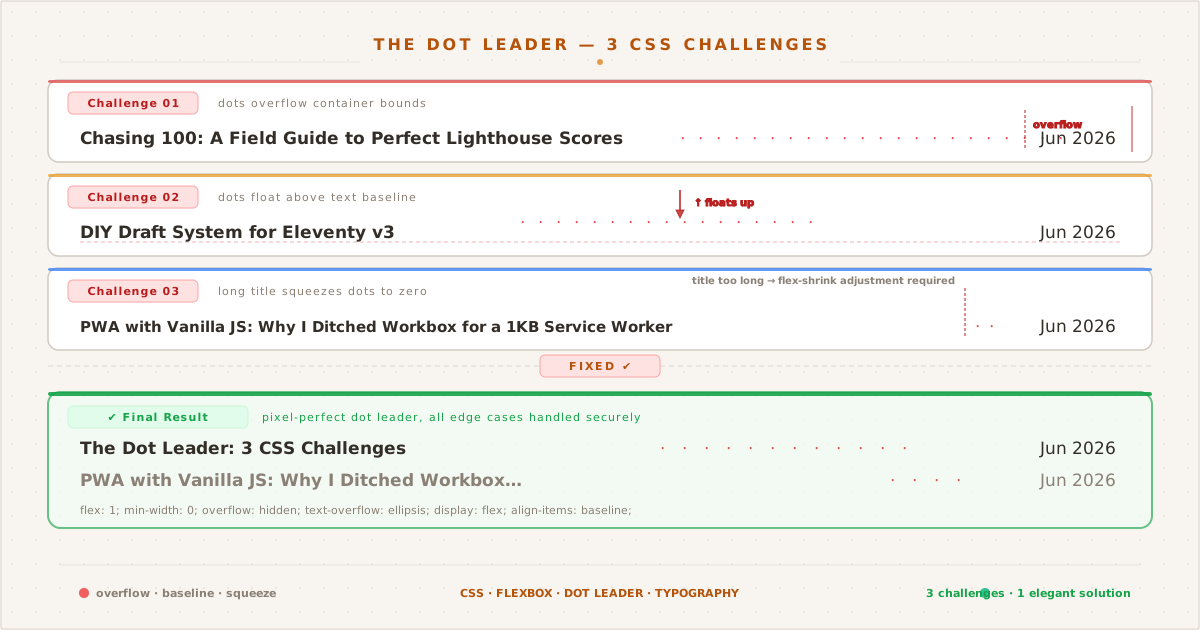
The post listing before the terminal revamp: dot leaders connecting titles to dates. The CSS below solves the three challenges visible in this layout.
The hero image above shows this blog’s post listing before the terminal redesign. The listing has since been redesigned to a terminal style, but the CSS challenges I hit while building this dot leader are worth documenting regardless of the current design.
A dot leader is a trail of dots between a title and its metadata, like a date — a classic pattern from 17th century printed tables of contents, where typesetters inserted periods between chapter titles and page numbers. CSS has supported building this pattern natively since 2015, when flexbox became broadly available.
One <span>, a ::before pseudo-element with repeating dots, and flex: 1 to fill the gap. The markup is minimal:
<li>
<a href="/posts/slug/">The Post Title</a>
<span class="postlist-dots" aria-hidden="true"></span>
<time>13 June 2026</time>
</li>But getting from that bare implementation to something that feels right on every viewport, at every font size, with every title length — that’s where the real work lives. Here are the three challenges I hit and how each one pushed the design forward.
Challenge 1: The Overflow#
The first version was exactly what you’d expect:
.postlist-item {
display: flex;
}
.postlist-dots {
flex: 1;
overflow: hidden;
}
.postlist-dots::before {
content: " · · · · · · · · · · · · · · · · ";
}The string of middle dots is longer than any possible gap between title and date. On wide screens, the dots span expands to fill available space and the overflow is invisible. On narrow screens, the dots simply clip at the edge. Title and date are always intact.
That works. But it has a problem: the dots sit on the text baseline, right next to the title text.
Challenge 2: The Baseline#
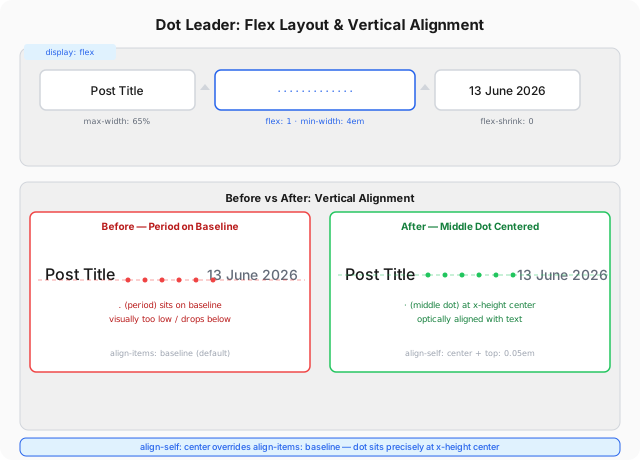
When you use a period (.) as the dot character, baseline alignment looks fine — the period’s dot sits on the baseline just like text. But the middle dot (·, U+00B7) is a different glyph. It’s designed to sit at x-height center, not on the baseline.
With align-items: baseline on the flex container, the middle dot floats noticeably above the text. The title and date sit on one visual line, and the dots drift above them. It’s subtle, but once you see it, you can’t unsee it.
The fix is align-self: center on the dots span, which overrides the parent’s align-items: baseline. The dots now center vertically within the flex container:
.postlist-dots {
flex: 1;
min-width: 4em;
overflow: hidden;
white-space: nowrap;
align-self: center;
display: flex;
align-items: center;
&::before {
content: " · · · · · · · · · · · · · · · · ";
position: relative;
top: 0.05em;
}
}That top: 0.05em is a micro-adjustment. Even centered, the middle dot sits a fraction of a pixel low relative to the text’s optical center. The nudge is invisible alone, but wrong without it. This is the kind of detail that separates a premium reading experience from a merely functional one.
Challenge 3: The Squeeze#
With dots and date handling overflow gracefully, I thought it was done. Then I tested with a long title:
"Service Worker Ate My SVG: A Debugging Story That Spans 3 Continents"The title pushed the dots span past the viewport edge, and the date wrapped awkwardly onto a new line. The dot leader wasn’t leading anything — it was hiding off-screen.
The fix was twofold. First, constrain the title:
.postlist-title {
max-width: 65%;
overflow: hidden;
white-space: nowrap;
text-overflow: ellipsis;
}The title now stops growing at 65% of the container width. Anything beyond that gets an ellipsis. This guarantees the dots and date always have room.
Second, give the dots span a minimum width:
.postlist-dots {
min-width: 4em;
}Even on the narrowest viewports where the dots are clipped to near-zero, at least two dots render — preserving the visual cue that connects title to date.
What the Final Version Looks Like#
The full CSS for the dot leader sits at about 30 lines, including the pseudo-element content:
.postlist li {
display: flex;
align-items: baseline;
padding: 0.3rem 0;
gap: 0;
}
.postlist a {
flex-shrink: 1;
overflow: hidden;
white-space: nowrap;
text-overflow: ellipsis;
max-width: 65%;
}
.postlist-dots {
flex: 1;
min-width: 4em;
overflow: hidden;
white-space: nowrap;
align-self: center;
display: flex;
align-items: center;
}
.postlist-dots::before {
content: " · · · · · · · · · · · · · · · · ";
font-size: 0.85em;
color: var(--text-tertiary);
letter-spacing: 0.15em;
margin: 0 0.5em;
line-height: 1;
position: relative;
top: 0.05em;
}
.postlist-date {
font-size: 0.8rem;
white-space: nowrap;
flex-shrink: 0;
}Each line addresses a specific edge case. None are speculative — every property here exists because a real viewport or a real title length broke the previous version. The padding: 0.3rem can be derived from the golden ratio hierarchy (discussed in an earlier post), where 0.3 creates a vertical rhythm that scales proportionally with font size.
The Takeaway#
The dot leader looks like a two-line pattern. And at a glance, it is. But the journey from two lines to thirty taught me something about CSS quality: the difference between “works” and “feels right” is almost never a single big change. It’s a stack of small ones:
align-self: centerover baselinetop: 0.05emmicro-nudgemax-width: 65%constraintmin-width: 4emfallbacktext-overflow: ellipsison the titleline-height: 1on the pseudo-element to prevent extra vertical space.85emfont size so the dots recede behind the content
None of these alone justifies a blog post. But together, they turned a functional pattern into something I’m happy to look at — and that I hope readers don’t consciously notice. Good CSS, like good typesetting, works best when it’s invisible.