CSS Cascade Layers: From Specificity Wars to @layer Architecture
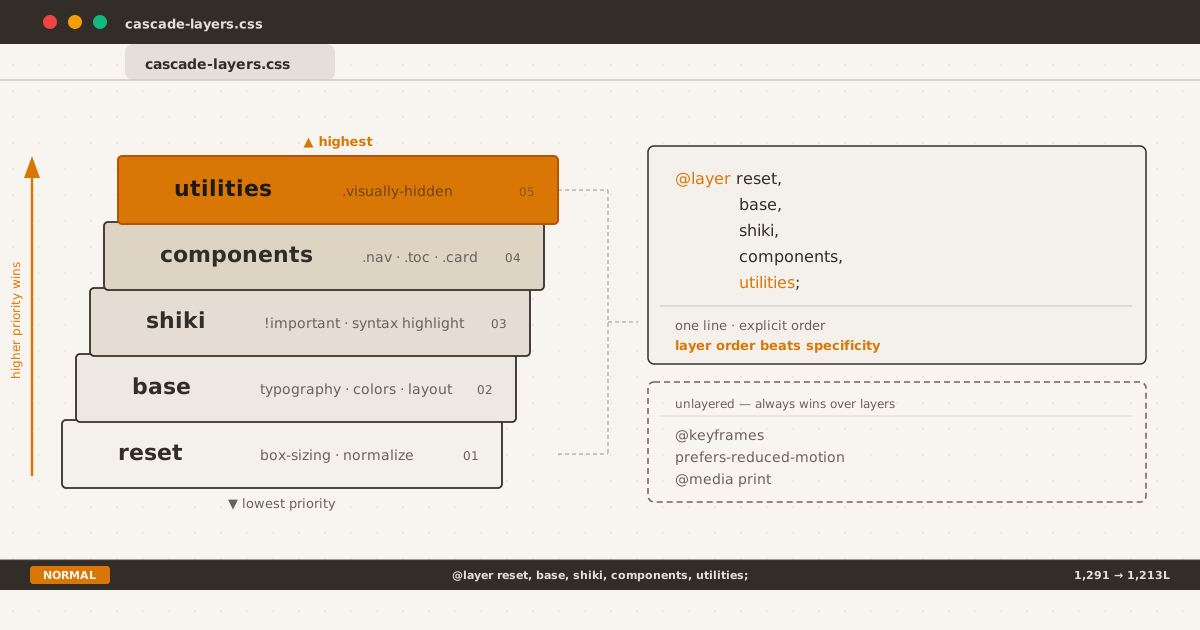
Layer order beats specificity. One declaration line — the entire cascade under control.
man css-cascade-layers
The Specificity Tax#
Every CSS codebase that lives long enough eventually collects the same kind of debt: a !important here to override a third-party widget, a nested selector there to win a specificity battle, and eventually a stylesheet where the cascade has become a mystery.
This blog’s CSS was no different. At 1,291 lines, content/assets/css/index.css had:
- Rules targeting
.shikiwith!importantto override Shiki’s inline styles - A flat
.cursorclass conflicting with the same class in.posts-page .copy-btn,.code-wrapper,.code-statusbar,.prompt,.status-mode,.status-infodefined twice — once in the global scope and once inside@scope (.shiki)- An
:scopeblock inside@scope (.shiki)duplicating properties already set in the parentprerule - No clear layering strategy — everything competed at the same cascade level
The CSS worked. But it was fragile. Adding a new component meant navigating a minefield of implicit priorities. One wrong selector and you’d trigger a regression.
@layer fixed that.
What Are Cascade Layers?#
Cascade layers let you declare explicit priority order for your style buckets:
@layer reset, base, shiki, components, utilities;This single line — the layer @import-style statement — establishes that any rule in utilities beats any rule in components, which beats shiki, which beats base, which beats reset.
Within the same layer, normal cascade rules apply: specificity, source order, !important all work as they always have.
Across layers, the layer order determines winner — regardless of specificity or source order. A .visually-hidden (a utility-layer rule with specificity 0,1,0) beats a h1 (a base-layer rule with specificity 0,0,1) even if both target the same element, because utilities is declared after base in the layer order.
This is the key insight: layers override specificity.
The Audit#
Before touching any CSS, I mapped every rule group in the file to a conceptual layer:
| Layer | Contents | Conflict points |
|---|---|---|
reset | box-sizing: border-box | None — single rule |
base | Custom properties, typography, links, images, code, blockquotes, tables, headings, body chrome | Dark mode [data-theme="dark"] blocks |
shiki | Shiki syntax highlighting overrides, light-theme color tweaks | All rules use !important — needed isolation |
components | Everything else: .header-anchor, .toc, .layout, .topbar, .theme-toggle, .post-exit, .notice, .home-terminal, .tree-listing, .curl-block, .posts-page, .article-page | .cursor collision; .copy-btn/.code-wrapper duplicates |
utilities | .visually-hidden | None — single class |
The ordering wasn’t arbitrary: components must override shiki (some component rules target .shiki’s children), shiki must override base (Shiki’s !important must beat base typography).
Layer Assignment#
The @layer declaration went right after custom properties, before any unlayered styles:
@layer reset, base, shiki, components, utilities;Then each block wrapped in its layer:
@layer base {
body { ... }
h1, h2, h3 { ... }
/* 168 lines of base styles */
}
@layer shiki {
.shiki {
font-variant-ligatures: none;
background-color: var(--syntax-bg) !important;
}
/* 25 lines of highlighted overrides */
}
@layer components {
.header-anchor { ... }
.toc { ... }
/* 892 lines of component styles */
}
@layer utilities {
.visually-hidden { ... }
}No selector changes. No property value changes. Just wrapping existing blocks in @layer rules.
The !important Isolation#
The biggest win was isolating Shiki’s !important rules. Shiki generates inline styles on every <span>:
<span style="color:#E36209">function</span>To override these for theming, you need !important. But !important in the global scope can leak into unintended conflicts. Wrapping them in @layer shiki ensures they only win against base and reset — components and utilities still override them without needing !important of their own.
@layer shiki {
.shiki {
background-color: var(--syntax-bg) !important;
}
[data-theme="dark"] .shiki span:not(.status-mode):not(.status-info) {
color: var(--shiki-dark) !important;
}
}The !important declarations still exist, but they’re confined to the shiki layer. Any component style can override them naturally — no !important arms race.
Duplicate Elimination#
Before the layer refactor, the flat stylesheet had these duplicates running at the same priority:
/* Global scope — 63 lines */
.copy-btn { ... }
.code-wrapper { ... }
.prompt { ... }
.code-statusbar { ... }
.status-mode { ... }
.status-info { ... }
/* Inside @scope (.shiki) — same selectors, same properties */
@scope (.shiki) {
& .copy-btn { ... }
& .code-wrapper { ... }
}I verified every element using these classes on the site is inside .shiki. The @scope version was proven to match the same elements. Result: 63 lines removed, zero visual change.
Similarly, the :scope block inside @scope (.shiki) duplicated the pre box-shadow and .shiki font-variant-ligatures — both already set in @layer base and @layer shiki. Removed.
The .cursor Collision#
.cursor appeared twice in the original stylesheet:
.posts-page .cursor— a blinking block cursor on the posts listing page.cursor(bare) — a text cursor at the end of each article, inside.post-exit
The bare .cursor was a collision waiting to happen. Both at the same layer, same specificity (0,1,0 vs 0,1,0), but the latter in source-order won — fragile.
The fix was to scope it to .post-exit:
@scope (.post-exit) {
.cursor {
color: var(--accent);
animation: blink 1s step-end infinite;
}
}Now .posts-page .cursor and .cursor inside .post-exit don’t interact. The @scope boundary prevents the collision entirely — covered in more detail in the @scope post.
What Stays Outside Layers#
Not everything moved into a layer. Four categories stayed unlayered:
1. Global animations:
@keyframes cursor-blink {
0%, 100% { opacity: 1; }
50% { opacity: 0; }
}@keyframes are global references — they don’t participate in the cascade. Wrapping them in a layer is meaningless.
2. Reduced-motion override:
@media (prefers-reduced-motion: reduce) {
*, *::before, *::after { transition: none; }
}This must win over every component’s transitions unconditionally. Unlayered styles beat layered styles by default — exactly what we need for accessibility overrides.
3. Global focus indicators:
:focus-visible {
outline: 2px solid var(--accent);
outline-offset: 2px;
}Browser UA focus styles are unlayered — if this rule sits inside a layer, the browser’s default blue ring wins. Keep it unlayered to guarantee your accent color appears on keyboard focus.
4. Desktop and print media queries:
@media (min-width: 768px) { ... }
@media print { ... }These were kept at the bottom of the file, unlayered. They adjust layout chrome and print styles — not specific component behavior that needs layer priority.
This follows the same pattern from Dark Mode Done Right: global overrides stay outside the layer system so they always win.
Results#
| Metric | Before | After |
|---|---|---|
| Total lines | 1,291 | 1,213 |
!important declarations | 8 (scattered) | 6 (isolated in shiki) |
| Duplicate rule blocks | 2 | 0 |
| Layers | 0 | 5 |
| Visual regression | — | 0 (verified) |
The build output confirmed: 87 files, 56 images, 0 errors. Same output, cleaner architecture.
Why @layer Matters in 2026#
@layer hit Baseline in early 2025 and is now supported in every evergreen browser. No polyfill, no build step, no JavaScript.
The real value isn’t theory — it’s the discipline it enforces. When every new CSS rule must be consciously placed in a layer, you think about priority before you write the selector. You reach for !important less because you can reorder layers instead.
Combined with @scope (covered in my previous post), CSS now has a complete architectural toolkit:
@layerfor cross-category priority@scopefor component containment- Custom properties for theme and token management
light-dark()andcolor-mix()for dynamic color — covered in From 16 Errors to Zero
No build tools required. Just CSS.
Lessons for Your Own Stylesheet#
If you’re considering a @layer refactor:
- Audit before layering. Map every rule group to a conceptual layer. Identify duplicates,
!importantusage, and collision points first. - Order layers by intent, not specificity. Ask: “when two rules conflict, which should win?” That determines order.
- Isolate third-party overrides. Wrapping Shiki’s
!importantrules in its own layer was the highest-impact change. Same applies for any library or framework CSS you override. - Keep accessibility overrides unlayered.
prefers-reduced-motionand forced-colors adjustments must win unconditionally. - Verify with a build. Run your build pipeline after refactoring, compare output. If there’s zero visual regression, you did it right.
/* Start with this: */
@layer reset, base, theme, components, utilities;
@layer reset { /* normalize, box-sizing */ }
@layer base { /* typography, colors, layout chrome */ }
@layer theme { /* dark mode, high contrast variants */ }
@layer components { /* cards, nav, code blocks, widgets */ }
@layer utilities { /* .visually-hidden, .sr-only, spacing helpers */ }The !important in your stylesheet isn’t a character flaw — it’s a symptom of missing layer architecture.