$ cat ~/redesign-log: Terminal Theme, Amber Accent, and the Pursuit of Consistency
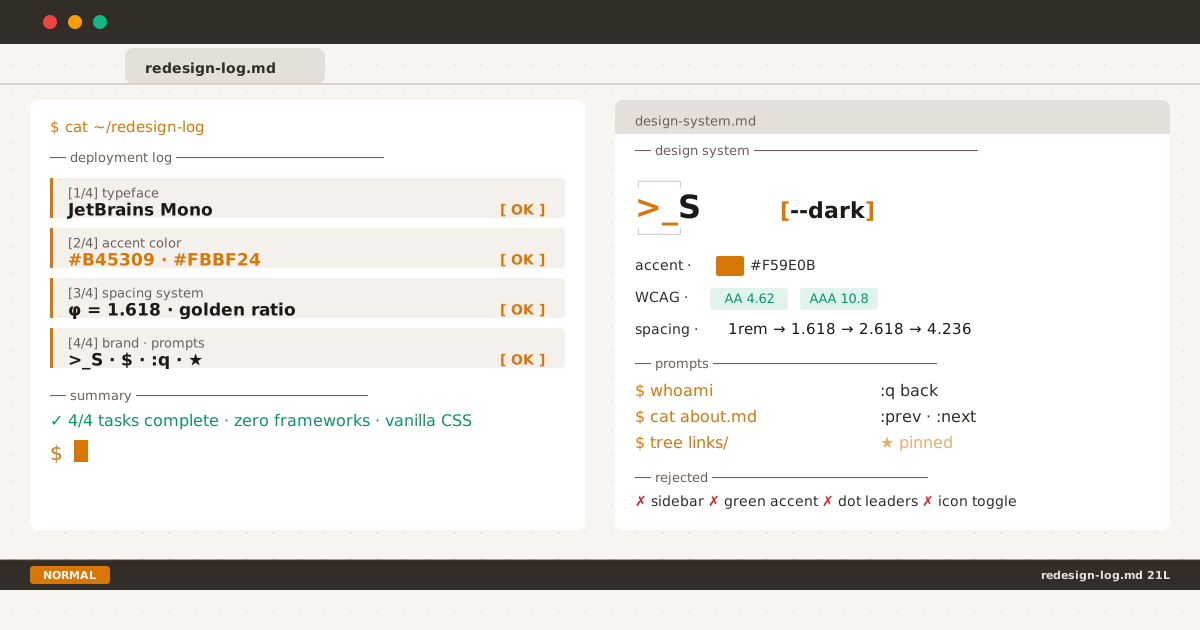
The full deployment log of the redesign — every change tracked, every step confirmed.
Every design system starts with a tension between what you have and what you want. This blog had a clean, conventional layout: IBM Plex Sans, a left sidebar with an “S” monogram, dot leaders between post titles and dates, and blue accent links. Nothing was broken. Everything was functional.
But it didn’t sound like me.
IBM Plex Sans is a beautiful typeface — I have nothing but respect for it. It carried this blog through its early posts with readability and polish. But this blog talks about terminals, about command-line workflows, about the tools we use to build things. It felt like I was writing about awk while dressed in a suit. Not wrong, but not aligned.
This post is the field log of that realignment. Every change, every rejection, every “why.”
Why Monospace?#
I switched to JetBrains Mono as the sole body font across the entire blog. I wrote about the thinking behind that decision in a separate post; here’s what it took on the implementation side.
JetBrains Mono was the natural choice. It’s one of the most readable monospace fonts at body sizes, with a large x-height, clear punctuation, and excellent variable weight support (200–800). The slashed zero and distinctive @ are small touches that reward close reading.
Self-hosting it was straightforward: download the variable TTF from JetBrains’ GitHub, convert to WOFF2 with fonttools, drop it in assets/fonts/, and preload it in <head>. The variable format means one file covers all weights — no HTTP overhead for bold or light variants.
But the real test wasn’t technical — it was reading. After two days of reading my own blog in JetBrains Mono, I stopped noticing the font. That’s the highest compliment a typeface can receive.
Finding the Amber#
Color was the hardest decision. Blue is the safe choice for web links — it’s universal, accessible, and battle-tested. But blue is also corporate. Every SaaS dashboard, every documentation site, every framework uses blue. I wanted something warmer.
I knew amber was the right hue from the start: it evokes terminals (green is the obvious alternative, but green-on-white is hard to read and green-on-black is cliché). The challenge was finding a specific shade that passes WCAG AA.
The first candidate was #F59E0B — a warm, energetic amber. It looked great. But against a light background (#f8f5f0), its contrast ratio is only 3.19:1. That fails WCAG AA for normal text (4.5:1) and barely passes for large text.
After mapping every amber shade between #D97706 and #B45309 with a contrast calculator, I landed on two values:
- Light mode:
#B45309(4.62:1 against#f8f5f0) — passes WCAG AA for normal text - Dark mode:
#FBBF24(10.83:1 against#161616) — passes with room to spare
Why not the same amber for both modes? Because perception changes with background. #B45309 on #161616 looks dull — it loses warmth. #FBBF24 on #f8f5f0 is unreadable. Two ambers, same brand feel, each in its own context.
For hover states, I went darker in light mode (#92400E, 3.19:1 — passes for large text / UI components) and lighter in dark mode (#FCD34D).
The Golden Ratio as an Organizational System#
The golden ratio (φ = 1.618) appears throughout this blog’s redesign. Not because of mystical proportions, but because an irrational number creates spacing values that don’t overlap with default browser increments. It forces intentionality.
The topbar uses 2px double border as a separator — mimicking the == config file convention. The spacing around it follows 1:1.618:
- Desktop: padding
2rem, margin3.236rem(2 × 1.618) - Mobile: padding
1.618rem, margin2.618rem
The breadcrumb gap between path and article title: 1.618rem.
The homepage terminal content max-width: 618px (approximately 382 × 1.618, where 382 is derived from a common layout split).
Each value relates to the next. Not because anyone will measure it, but because a consistent ratio eliminates the “is this spacing right?” question. When every distance belongs to the same family, the layout feels coherent without calling attention to itself.
Terminal UX Patterns#
The most visible change is the interaction language. Every page adopts a command-line metaphor:
| Page | Prompt | Meaning |
|---|---|---|
| Home | $ whoami | Who runs this blog |
| Home | $ cat about.md | Read the about file |
| Home | $ tree links/ | List external links |
| Posts | $ posts | You’re in the posts directory |
| Posts | cat thoughts.log | Loading the log |
| Tag | $ cat tag/css | Filter by tag |
| Article | $ cat ~/posts/hello-world.md | Reading a specific file |
| Navigation | :q back to posts | Vim quit command |
| Navigation | :prev / :next | Vim buffer navigation |
The prompts aren’t decorative — they establish a consistent mental model. cat means “display content.” ls means “list directory.” $ means “you can type here” (metaphorically, for clicking).
The vim-inspired :q, :prev, and :next commands replace traditional “← Back” links. The :q command is particularly polarizing — non-vim users don’t recognize it. But that’s fine. It’s a signal. Like a secret handshake for the terminal-inclined.
The >_S Brand#
The original favicon was a standalone “S” in a rounded square — clean, minimal, but generic. The new >_S prompt encodes two ideas at once:
- The terminal prompt character
>followed by a cursor_ - The letter “S” as the blog initial
In the topbar, >_ is amber (the prompt) and S is the text color (the program name). In the favicon, single-color works because at 16×16 pixels, nuance is lost anyway.
The favicon family — SVG, ICO, Apple Touch, Android Chrome, maskable — was regenerated from a single SVG source. Consistency across platforms matters because the icon is often the first impression a reader has.
The Neofetch ASCII Frame#
The >_S logo sits inside a neofetch-style ASCII box in the topbar — ┏━━━━━┓ above and ┗━━━━━┛ below — rendered via ::before and ::after pseudo-elements on the site logo link. The box uses amber at 0.65 opacity by default, brightening to full opacity on hover. The heavy box-drawing characters (┏/┗/━/┛) were chosen over light ones (┌/└/─/┘) to match the terminal aesthetic — thick enough to frame the prompt without overpowering it.
The frame serves two purposes: it visually anchors the logo in the topbar’s double-border layout, and it signals “terminal” before the user reads a single word. Like a neofetch output at login — decorative, but identity-defining.
What Was Rejected#
Not every idea made the cut:
- 3px double border → rejected for 2px (3px was too heavy at mobile sizes)
- Green accent → rejected for amber (green-on-white fails readability for body text)
- Sidebar → rejected entirely (single-column reads better on all screen sizes)
- Dot leaders → rejected in posts list (terminal vibe doesn’t use dots)
- Icon-based toggle → rejected for text
[dark]/[light](text shows the action, not the state) - Removing the topbar entirely on article pages → rejected (the logo and toggle need to be accessible)
Each rejection taught me something about the design’s north star: terminal vibe, not terminal replica. This isn’t a terminal emulator — it’s a blog that borrows terminal conventions where they improve clarity.
A Note on the Older Posts#
You might notice that some posts on this blog reference elements that no longer exist — the sidebar, the IBM Plex Sans font family, the 55×55 “S” monogram, the golden-ratio toggle dimensions. Those posts are marked with a notice box at the top — an amber left border with a > prefix — signalling “this describes the previous design.” (See the full case study on this notice system.) I chose not to rewrite them because they document a real evolution. Design is a process, not a product.
Lessons Learned#
- Constraints over creativity. The golden ratio eliminated more decisions than it created — and that’s its superpower.
- WCAG first, aesthetics second. The amber you love at 3.19:1 is unusable for normal text. Find the shade that works for everyone, then make it beautiful.
- A monospace body font is polarizing. You’ll lose readers who find it uncomfortable. Accept that before you start.
- Systematic spacing beats pixel-pushing. When every gap is
1.618remor2.618rem, you stop thinking about individual values and start thinking about ratios. - The best design system isn’t the one you plan — it’s the one you discover through iteration. Every value in this redesign was measured, tested, rejected, adjusted, and re-tested. The final result is a snapshot, not a finish line.
This entire site is open source on GitHub. The favicon SVGs, the CSS architecture, and the Eleventy configuration are all there — fork, adapt, make it yours. Complementary reading: why gray hue matters for dark mode and the optimization trap of color iteration. Previously pinned — see the framework behind that decision.